
Every team running Kubernetes ends up building the same thing underneath their apps: ingress, certificates, secrets, monitoring, a dashboard. App teams do not want to build that stuff. They want the Heroku dream: “just run my app for me”.
Enterprises call this pattern the internal developer platform or IDP. This is usually a privately hosted, self service ‘vending machine’ dashboard for: clusters, an addon manager, identity, wiring and data access, setting policies, and developer tooling with CI/CD, app deployment and more.
The common parts are often exposed through an IDP catalog of parametrised and predetermined configuration patterns. Many catalogs are based on Helm charts.
NOTE: if you are reading this and have your own platform, I think you might like to add ConfigHub to track and manage configurations. With that in place you can easily add more operational features (eg using AI). This blog should show how.
Meet kubara — the platform foundation
If you have not met kubara, it is a framework for Kubernetes that provides addon management, wiring deployment and some Day-2 Operations support. Essentially a mini-IDP that focuses on the catalog-to-addons story.
As a user and platform owner, you describe your clusters and the capabilities you want. It selects components from a curated catalog, pins their versions, works out the order they need to go in, and generates the platform files. Artem Lajko, a founding member of kubara, and part of the team building it, has written both an introduction and a walkthrough on a local kind cluster. If kubara is new to you, read those first.
Kubara uses the word catalog as follows:
-
a kubara catalog packages reusable platform architecture
-
including service definitions, Helm charts, Terraform modules, Kustomize files, CRDs, scripts, and templates
-
from which concrete platform state can be generated
-
as config manifests in standard formats (OCI, yaml)
In general I find kubara to be a kind of catalog to addons factory; a model that is 100% worth understanding if you build platforms. Especially when using Helm charts and custom values. A good introduction blog is here.
We Added ConfigHub to kubara
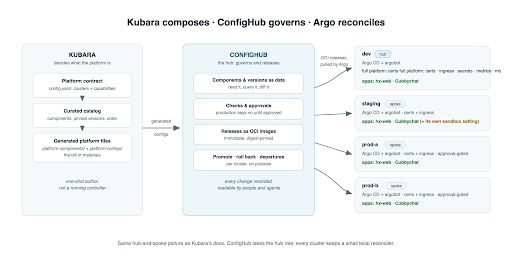
Now let’s combine ConfigHub and kubara. ConfigHub sits downstream of the kubara CLI and stores platform-ready kubara configs, which we deploy as OCI images using Argo. Simple. Everything is on GitHub at github.com/confighub/kubara-confighub with more back story too.
We have built two things for you.
-
Tools to create your own kubara with ConfigHub
-
A complete reference implementation that you can run, with several services and example apps
As mentioned, the integration flow is very simple. Kubara has a CLI which, when given a catalog input, will generate all your configs and then commit them to Git. After this Argo CD reconciles with the live systems. In our integration ConfigHub imports configs from Git, creates multiple custom, verified, live-ready variants, and outputs them as OCI for Argo to deploy.
Using kubara’s CLI:
-
Select and configure services from the kubara project’s public general catalog
-
Add organization-specific platform definitions through your own external catalog and documented values overrides.
-
The generated platform can provide shared capabilities that applications consume.
In the normal kubara workflow you will declare clusters and desired platform services in a config.yaml file and pin the catalog version(s), and then let kubara render the effective catalog into reusable platform-components/ and cluster-specific platform-configs/. We’ll show examples of application deployment below.
NOTE: In the standard kubara ‘standalone’ workflow, the kubara CLI generates configs and commits them to Git; then Argo CD reconciles with the live systems. But in our ConfigHub integration, we do it a little differently. This time the kubara CLI still generates configs into Git, and then ConfigHub imports these configs from Git, and stores them in our configuration database. ConfigHub then releases updates via OCI and ArgoCD.
Why add ConfigHub?
Today ConfigHub stores everything that kubara generated as configurations you can read, check, approve and promote, and it owns the release that each cluster pulls.
This enables operational controls: Which exact version of each component is on which cluster right now? Who approved this before it reached production? Can I roll one production cluster back without touching its twin? Is anything left running that nobody owns?
In the future we would like to continue adding operational capabilities that simplify human and agentic applications that require configuration and context. Promotions, staging, rollouts and fleets are a current focus — in combination with AI and compliance. Interested? Get in touch.
We chose kubara because like Sveltos it is an elegant GitOps-based design that aligns with our vision. You should definitely consider it if you have Helm charts and want them to behave :-) Or if you have built your own IDP try using these patterns with ConfigHub.
Show me the reference implementation
This is all set up for you. Four clusters.
-
One ‘kubara hub’ = our dev cluster
-
Three ‘kubara spokes’ = 1x staging cluster and two production clusters
In this reference implementation, each cluster runs an Argo CD and a small ‘argobot’ that tells Argo to sync as soon as a release is published. cub cluster up installs Argo CD on each cluster, and ConfigHub maintains its configuration from then on.
A note for Flux users: ConfigHub publishes reviewed releases as OCI images, and we have a verified test run where Flux reconciled one of those digests and the workload came up. So your own Flux should take this too.
As well as Argo, our kubara reference platform has some platform services:
-
cert-manager for certificates
-
Traefik for ingress
-
External Secrets
-
Metrics Server
-
a Prometheus and Grafana stack for monitoring
-
a Homer landing page
The dev hub runs all of these. The spokes run cert-manager and Traefik. Sixteen component instances across the fleet.
We also run two apps:
-
hx-web is a small nginx with an Ingress and a Certificate
-
Cubbychat is a three-tier tutorial app with Postgres, a backend and a frontend
Both are reachable over HTTPS through the platform’s ingress, with a certificate the platform issued, on all four clusters. As noted this is all set up for you.
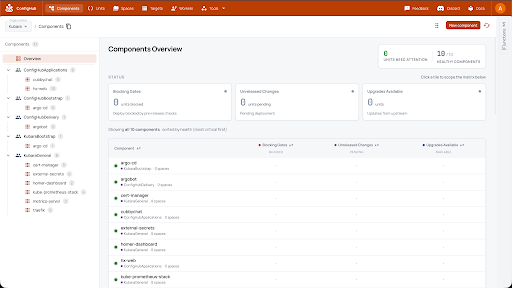
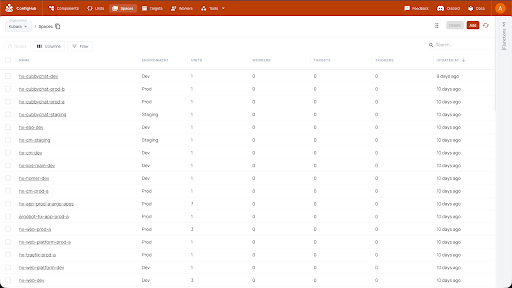
In ConfigHub that comes to 53 Spaces, 63 managed Units, and 25 links recording what each app needs from the platform. On the clusters there are 35 Argo Applications and no ApplicationSets.
HOW we integrated this
We selected seven platform services exposed by kubara’s versioned general catalog and declared the required clusters and service configuration in config.yaml. Kubara validated that intent against the effective catalog and generated reusable Helm-based platform components plus the cluster-specific configuration. We reviewed the generated result and the dependencies between the selected services before handing it to ConfigHub.
Two of them are about metrics, because metrics comes in two kinds: Metrics Server for the live numbers that autoscaling reads, and the Prometheus stack for dashboards and history.
We made an important implementation change. We dropped kubara’s own Argo CD deployment because ConfigHub already runs one on every cluster. That means the platform contract in config.yaml still declares what the platform should contain, Kubara validates and renders it with the effective catalog, and ConfigHub delivers the adapted output using the generated bill of materials used by this integration. So the implementation is an “adapted kubara platform”. We checked correctness by verifying parity of the two versions: adapted and unadapted.
This worked well — we only ran into a couple of minor issues, like how to wire up secrets management. kubara and ConfigHub are both young projects so this was not surprising. But it was very pleasing that all solutions came easily.
Trying out Two Applications
We have two apps for demos. Cubbychat, the three-tier chat application from the ConfigHub Tutorial, is the realistic one: a Postgres database, a backend and a frontend. hx-web is a plain nginx, the smallest thing that can prove an end-to-end web flow. Both use the shared platform.
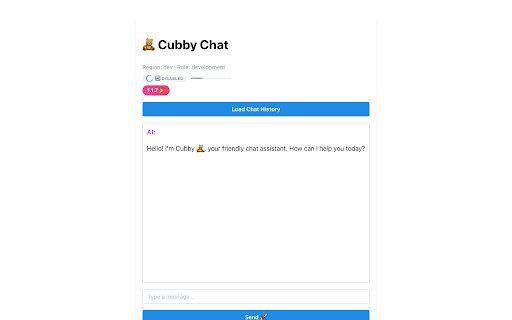
The pattern is identical for each application. You bring your app, add an ingress to put it on the network and a certificate for TLS, and the platform does the rest. cert-manager and Traefik are shared platform capabilities, generated from the kubara catalog: the app team does not install them, maintain them, or think about them much. Like in an IDP.
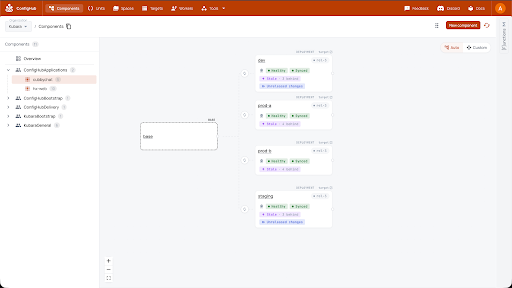
Above: Cubbychat in ConfigHub: one base, four deployments, each Healthy and Synced with its own release. From here you click into diffs, version history, approvals and the rest. And when you want the reconciler’s view, ConfigHub units are wired to their Argo applications, so you flip straight to the Argo GUI.
Then we added a second application: hx-web. This has an end to end web flow, and notice that cert-manager and Traefik are shared platform capabilities generated from the kubara catalog. Three tiers, a route, a cert and serving over HTTPS on all four clusters.
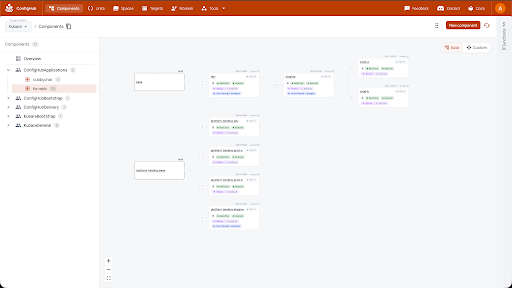
Above: The hx-web app; and its platform binding of the ingress and certificate. Note: in Cubbychat the binding and the app are tightly coupled. But in some use cases you want infra bindings kept as separate configs and version history. The app is on releases 8 and 9; the binding on 2 and 3. Workload changes and network changes may move at different speeds.
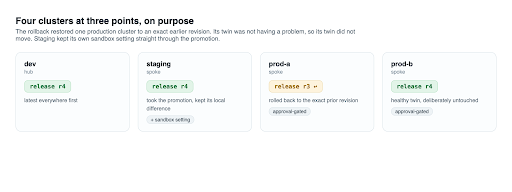
Then we changed hx-web once, from two replicas to three, and promoted it; then we rolled one production cluster back. This is one place where ConfigHub earns its keep: safe, fast changes. Staging kept its own sandbox setting straight through the promotion. The rollback restored one production cluster to an exact earlier revision while its twin stayed on the new release.
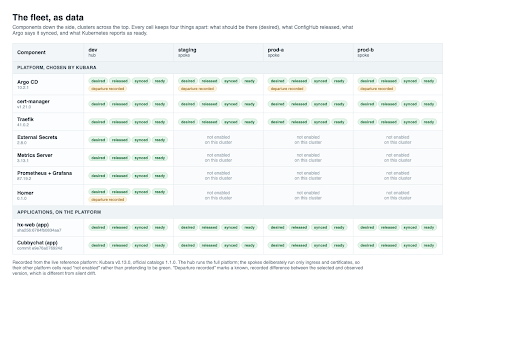
To see the whole estate at once, we generated a report for this post (Claude did the legwork): the platform plus the apps as a grid, components down the side, clusters across the top. Every cell keeps four things apart: what should be there, what ConfigHub released, what Argo says it synced, and what Kubernetes reports as ready. Those are four different facts, and most outages live in the gaps between them.
Approvals — a ConfigHub feature
We might like AI changes to be approved by a manager, and have the record bound to the revision that was there when they approved it. ConfigHub supports this as a first class option. Approvals can act as release gates for example.
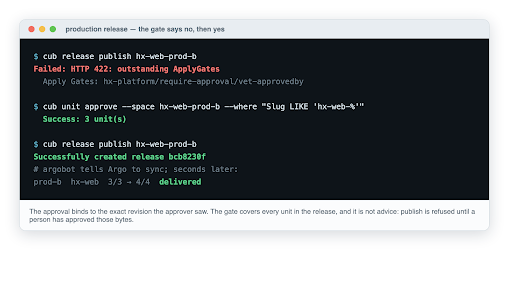
Often approvals are part of a larger set of “jobs to be done” around an application component. Maybe you also have to check that applications have sync’d correctly too. Maybe agents are proposing changes at the same time, or need to check settings from past changes. All of these are potentially important machine-verifiable context for human, manager and agentic decisions.
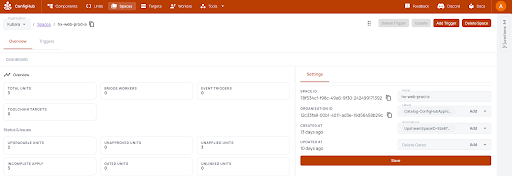
Try the platform, try the apps
I would encourage you to deploy the platform and run apps. Maybe vibe code an app or two and deploy them onto the mini-IDP. Point your agent at the ConfigHub docs as well as your own code, and let it propose the changes. Or if you like you can ‘rehearse’ the whole thing on your laptop with npm, and no cluster, no account. Just use this little verifier tool:
npm run kubara-adoption:self-test
The tool reads the kubara config, compiles the generated platform into packages, imports them, and hands off the application releases, against local stand-ins throughout. Success means the tooling you would later run for real should still work, end to end, including refusing bad input.
We also have a live reference platform running inside ConfigHub. This is four clusters and both apps, and you are welcome to come and look around it: the components and their versions, the promotion history, the approval rule on production, and the grid above with real values in it.
Sign up, and/or get in touch with me, and we will show you the live one before you build your own.
Finally when you want to build your own kubara platform properly and using ConfigHub, follow the instructions in the repo.
Build the platform once. Keep the output as the record. Then run your apps, and your agents, on top of the record instead of on top of a rebuild.
– alexis