This post is about how ConfigHub is SIMPLER than other approaches.
Today’s post is very “hands on”.
This is because we are open to everyone now! Read Jesper’s note about what changed and why. And please try our updated ConfigHub tutorial.
Why ConfigHub is cool
Imagine a company running an AI app called Cubby Chat. There is a production app and a dev app for testing. Both are built from a common base, and each is deployed to its own cluster.


The platform team looks after the base configurations for all the apps. The app teams change things as they go, which is normal, and both of those happen at the same time.
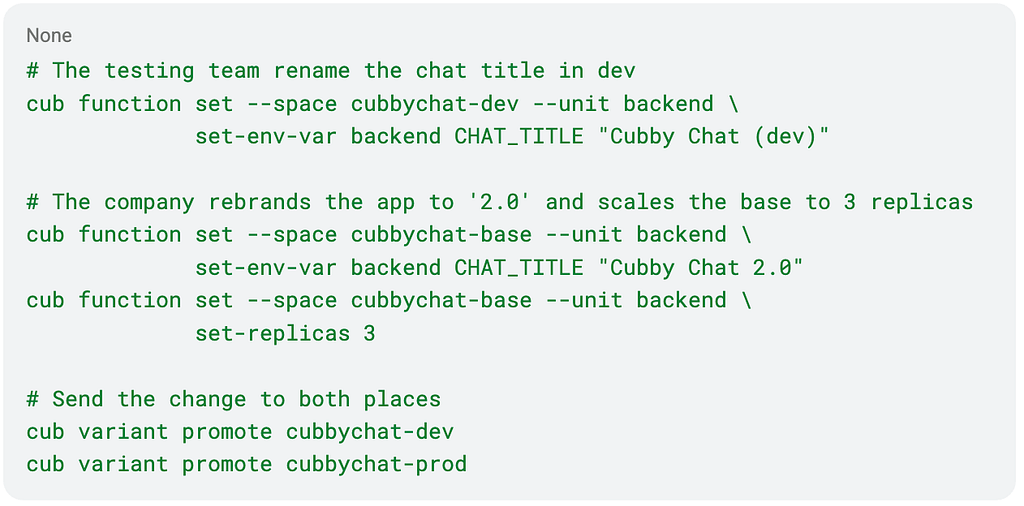
What just happened
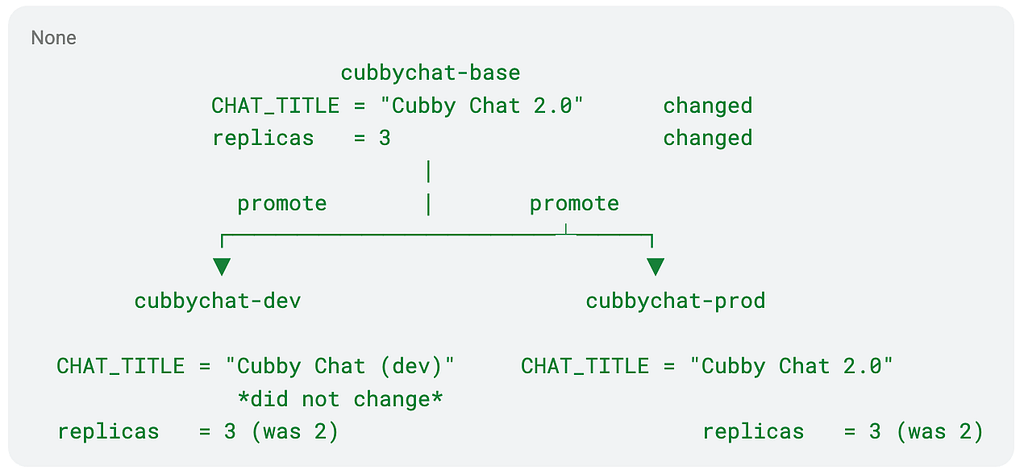
The change to the base flowed out to dev and to prod.
-
Prod took all of the change
-
Dev took the new replica count but kept its own chat title, because dev had changed that field itself and ConfigHub had recorded that
-
Promote merged everything else, and left that one field alone in Dev.
SIMPLER:
Gone is all the logic for re-generating config for every single environment or change. This effectively simplifies your source code, and organises your configuration data. Now the platform team can upgrade the base without ‘clobbering’ the app team’s changes!
We also have a more intuitive data flow through the graph of configurations:
The model: Components, variants and releases
A component is the configuration for a logical piece of software. Cubby Chat is a component, and so are its backend, frontend and database, depending on how you want to group them.
A variant is a stored instance of that component. Some are base variants that exist to be copied from, which is what cubbychat-base is. Others hold the configuration for one live deployment on one cluster, and we call those deployment variants. Here they are cubbychat-dev and cubbychat-prod.
A release publishes a variant’s configuration as an OCI image, which Argo or Flux then pulls and applies. So the deployment variant is what you edit, and the release is how it gets to the cluster.
Those two things are separate on purpose. You can change the base, promote it to as many variants as you like, look at what you have, and release your changes when you are ready. Nothing reaches a cluster until you publish.
The mission: Simpler, faster and safer changes
Why are we here? Today’s tools are powerful but too complicated. Changing apps like Cubby Chat should be simple, fast and safe! Without using all of the extra machinery we normally build around apps. Instead, a simpler model using a config store with automatic data validation.
We did not need an exclusion list, or a set of rules, or a do-not-overwrite annotation. We did not need a separate values file for dev. We did not need someone on the team who remembers which environments are special and why. Instead, fields have owners. Someone changed the title in dev, ConfigHub recorded it, and ‘promote’ left it alone.
We also did not have to fight the rest of the stack. Git merges text, so the last writer wins and the loser leaves no trace. Helm rebuilds its output from the chart, so an edit made afterwards is gone at the next upgrade. Kustomize lets you express the difference, but once it is rendered nobody knows who owns a field. Argo and Flux faithfully apply whatever they are handed, including over the top of your change. None of these tools are wrong, and none of them record who touched what, which is why every team ends up maintaining that exclusion list by hand.
The tutorial: explained
Start with a fresh install and nothing running. The next steps should take 15mins or so.
cub cluster up --name dev builds a kind cluster on your laptop, installs Argo CD in it, and wires it to ConfigHub. One command, and you have somewhere to deploy.
cub variant upload installs the component. Cubby Chat arrives as a bundle of ordinary Kubernetes YAML, with no templates and nothing to interpolate. It becomes the base, four units, one per file, with the namespace left blank because the base does not yet know where it will run.
cub variant create dev cubbychat-base --target dev/target --namespace cubbychat creates the deployment variant for the dev cluster. It copies the base, fills in the namespace, points at the cluster and writes the Argo Application. Nothing is running yet.
cub release publish cubbychat-dev publishes that configuration as an OCI image, Argo pulls it, and the app comes up.
This is ordinary GitOps, in the pull style. ConfigHub publishes releases and your existing tools fetch them, which means ConfigHub holds no credentials to your infrastructure at all.
The big picture: Operations on the config graph
Our technology aims to simplify and automate operations, using a declarative model where configuration is data. Day to day, that turns into a loop: change the base, promote to dev and prod, and release when you are ready.
The graph underneath is doing important work. When ConfigHub copies a configuration, it records where the copy came from and which version it took, so dev and prod both know they came from the base. ‘Promote’ takes that record and reads it forwards, meaning: catch up with the base. Dev keeps its own title in the example, as explained. Everything else is built from basic verbs: read a configuration, copy it, change it, and keep a record of what happened. A change to a value will affect copies of that value. And a new cluster is one more copy. There is no separate ‘folder’ system for overrides.
This all lets us calculate a change’s blast radius: Because every copy records where it came from, the store can work out what a change will reach before you send it, across every environment that has copied from it (cf. more).
That stuff is more advanced: for when we add agents, and when we scale up. What we have not shown you today is how to order operations. E.g. update order, copy order, promote prod after dev. That is an operational decision about how your team works, not a fact about your configuration, so here you make it by typing the two ‘promotes’ in that order. More on that soon.
Where this fits: simplifying operations
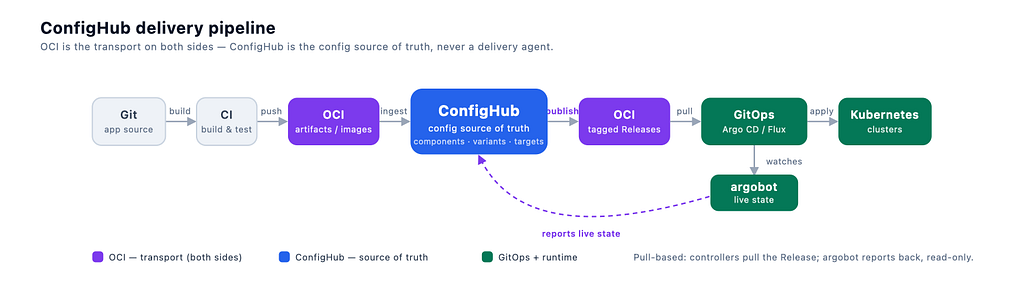
ConfigHub fits most easily into any GitOps flow that has adopted OCI. The operational loop will be shorter and simpler as shown below.
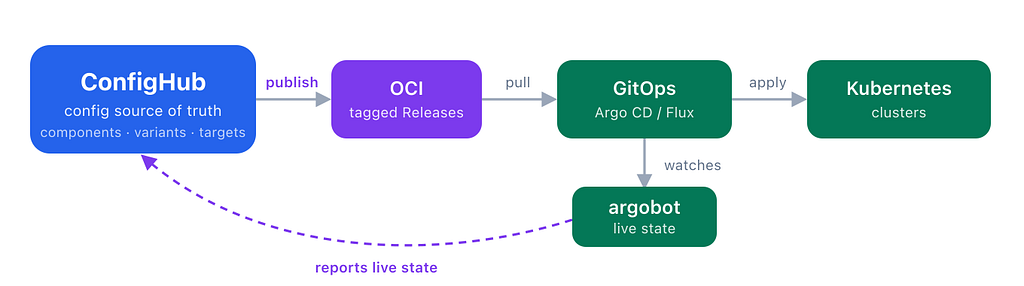
You can check the endnotes(*) if you want to see a delivery image with Git/CI.
In today’s example we did four “jobs” in ConfigHub: deciding config changes, reviewing and promoting, and checking they worked. There are more jobs to do — for future blog posts :-)
Also today our example was 100% manual. In future I will write about adding more automation, and when an agent is the one proposing the changes, and tie this back to the themes of my GitOps meets AI posts. Eg. release gating is being reworked, so you cannot block a publish on a policy check today. Delete protection on production units is in the tutorial.
Try the example with ConfigHub now!
Please take a minute to sign up to try our developer SaaS. All you need is Docker and a laptop.
Install the open source CLI and try the tutorial. Try out what we did here today: Change the title on the base, promote it to both, and watch dev keep its own.
Let’s keep it simple!
– alexis

A note on Git and CI
Source code lives in Git. You may want to generate your configuration from source code, or you may want to have AI write it, or produce it using special config generator tools like Cuelang, Pkl or Helm.
I talked about the pros and cons of “generative” config, and Generative GitOps, in the earlier series of posts.
Whatever approach you use, please note that you want your configuration data to be centralized in one store, if you want a scalable, safe, fast and fully agentic operational GitOps platform.