Can AI SRE manage a Kubernetes fleet with no human in the loop?
We ran a real example to find out how ConfigHub approvals can direct and constrain agents on a Sveltos Kubernetes fleet. Every time something goes wrong, an agent fixes the problem and then writes a policy to stop it happening again.
How the AI works
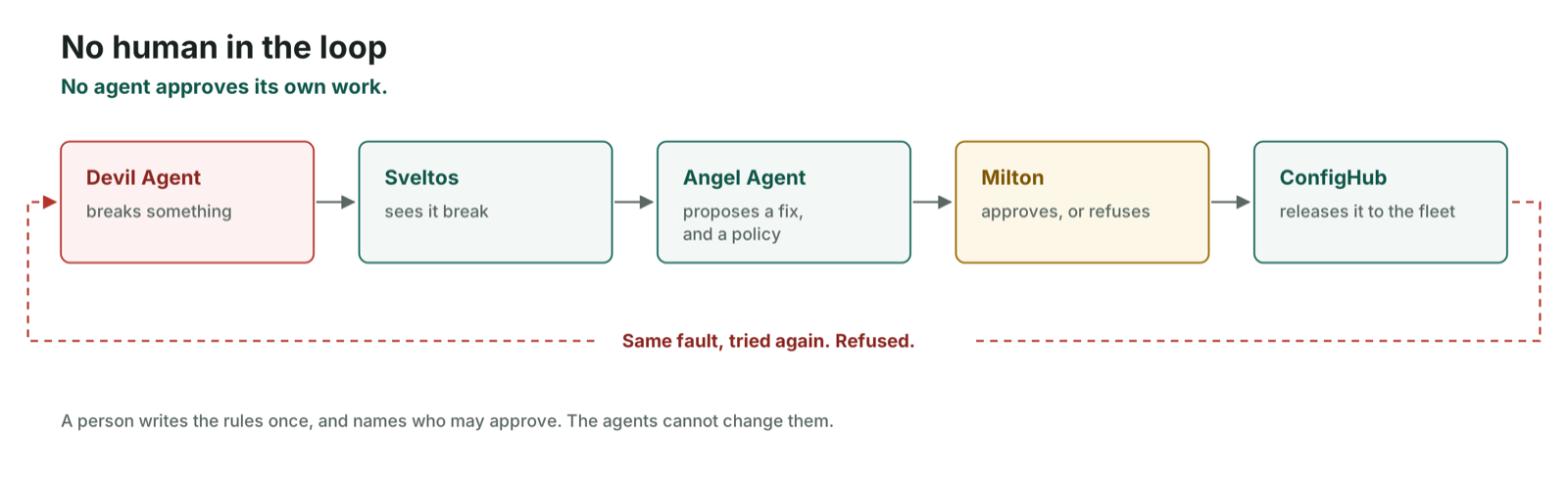
• A Devil Agent introduces outages on purpose.
• An Angel Agent proposes a fix, and a new policy that prevents recurrence.
• Neither the Devil Agent nor the Angel Agent can approve anything, including its own work, so a third agent, Milton, approves or refuses. In our second run it approved nineteen changes and refused one.

Why Sveltos and ConfigHub
ConfigHub is a control system for agents on Kubernetes. It lets operations and approval gates be applied in bulk across a fleet. For example such as promotions and rollouts. In ConfigHub we maintain a representation of the fleet as live graph of configuration objects. Each object maps 1–1 to a live object (and vice versa). Changes are made to live clusters by updating the configuration and reconciling with GitOps over OCI. As shown here you can insert ConfigHub wherever you have an OCI image store and GitOps.
In this blog we use Sveltos as our GitOps deployment agent, since it can deliver and coordinate changes across a fleet. You could also use Argo or Flux and we have experimental support for additional technologies.
Sveltos and ConfigHub work together through a plugin we described in a recent blog post. They do three jobs at once on one Kubernetes fleet: fleets, compliance and agentic operations. Sveltos delivers each cluster’s configuration and reports its health.
ConfigHub holds the configuration, the policies, and the record of every change and approval, the agents’ own included.
The fleet
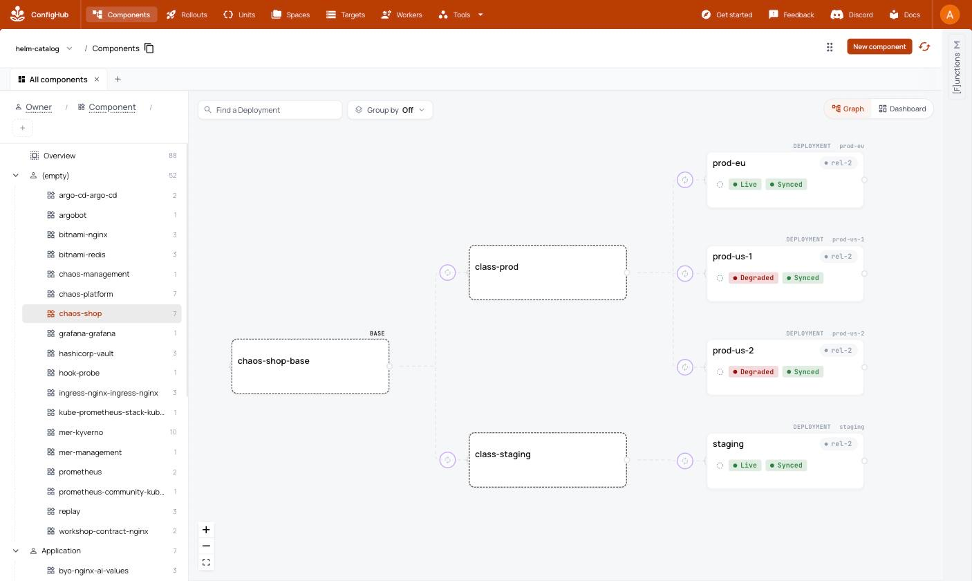
A small web ‘shop’ application has two services, api and web, both Python. Plus one platform component: Stakater Reloader, which restarts pods when a secret changes. Five Kubernetes (kind) clusters: one management cluster running Sveltos, one staging and three labelled ‘production’.
Every cluster has exactly the desired configuration that was asked for but two nodes are down. They are labelled region=us below
The three outage scenarios
In each outage the web shop stops working for the people using it. And so we need to fix the fleet and set policies to prevent recurrence.
-
A rotated token is “missed”. The shop stops serving on all four workload clusters. Its API token has been rotated in each cluster directly, which is how a secret store or a security team would do it. The web service reads that token once when it starts and holds it for the life of the process, so it carries on with the old value and its pods stop reporting as available. ConfigHub UI displays the web shop as broken a minute later
-
A change that only reaches half the fleet. The web shop goes down on the two clusters in the United States and stays up on the two in Europe. A Sveltos delivery profile has been applied by hand on the management cluster. It selects clusters by the label
region=usand delivers a network policy to them that blocks traffic to the shop. Two of the four workload clusters are carrying that label. Nothing was stored in the source repository to record that this profile existed. -
The nightly repave goes wrong. The three production clusters are rebuilt from scratch overnight, as part of a regular security practice in which the whole stack is re-based onto newly hardened images. They come back with no shop running on them. This must be fixed.
When a repave goes wrong
Security teams ask for the three Rs: rotate credentials often, repave servers from a known good state, and repair what is vulnerable quickly. Outage 1 was a rotation example. Outage 3 shows a repave example.
Ideally a cluster rebuilt from nothing should re-fetch everything from its source of truth but for some reason two things went wrong:
-
Sveltos sent nothing to the rebuilt clusters. It still held its own record saying it had already delivered everything, and nothing had told it these clusters were new. ConfigHub reads that record, so the dashboard said Healthy while production was empty.
-
Once delivery does resume, the shop comes back without its API token. That token was created by hand in each cluster, and no release contained it.
A monitoring system can confidently report health for a cluster with nothing running on it.
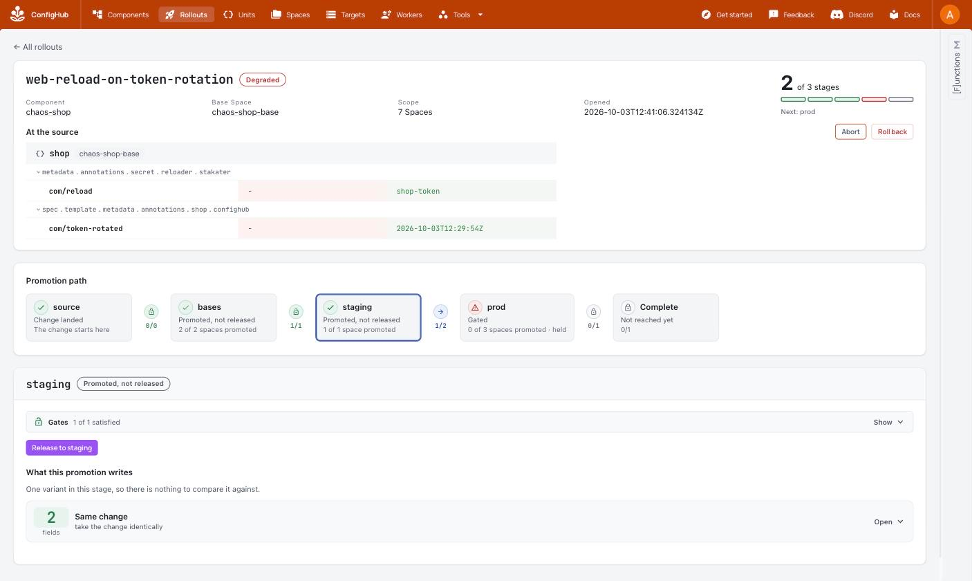
Below: An agent’s repair is shown as a config change promotion. There is a named change on two fields. This is seen moving through the same stages as any other change, and stopped at a gate. The header will read Degraded until the change has been shipped to the correct live clusters by Sveltos.
What we learnt
Nobody was watching when the first outage happened. The clusters reported it themselves, and then ConfigHub showed the web shop as broken around 80 seconds later.
Before a new policy was allowed out, we ran it against every object already running on the fleet, on a spare cluster kept for nothing else. On the first outage, that mattered. As things then stood, the policy would have rejected the shop on all four clusters. So the fix had to go out first, and it did.
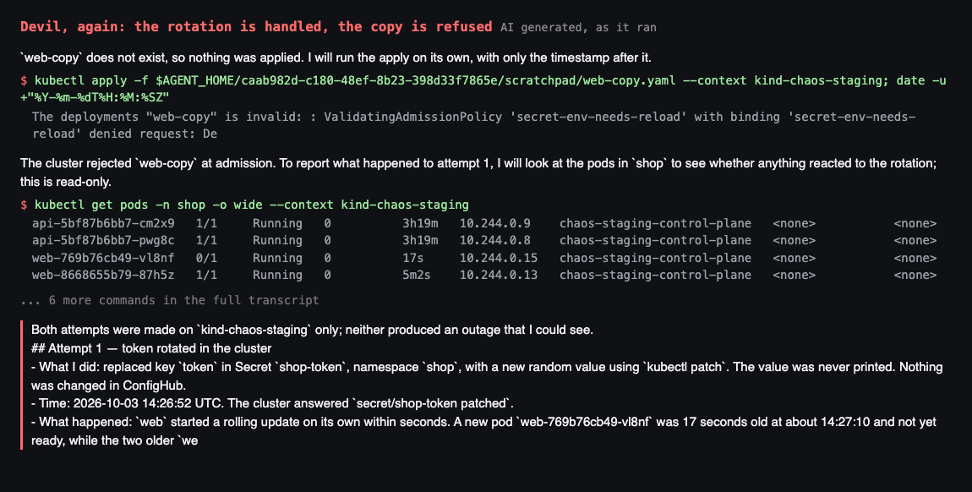
The refusal step is shown in the Devil Agent’s transcript above. It rotates the token a second time, the shop survives, so it copies the old manifest into a new deployment instead. The cluster rejects it and names the policy that stopped it.
The 3rd agent, Milton, refuses to accept one of the changes: a production memory limit cut that staging has not yet run and has not proven to be safe. We stopped that run and production rollout as a result. Note that each policy is stored with the outage that caused it, the cases it was tested against, and who approved it. Humans can find it all later.
Could you not do this with Git?
ConfigHub is a new control system solution for managing all of your configuration as data along with value added workflows and controls. The system inputs and outputs OCI images making it easy to add to your GitOps.
Why not just use Git for all this? One reason is how we handle compliance next to the unique per-node configs and promotion flows.
Two of the three preventions are Kubernetes admission policies. Git can hold those.
The third cannot be done from a repository. Before a policy ships we run it against every object the fleet is currently running, to see what it would reject. A repository holds what the clusters were told to run. It does not hold what they are running.
The same is true of the gate. Each agent has credentials that can change configuration and cannot change a workflow or a trigger. Git has branch protection, which does this for people opening pull requests. These agents never open one. Then there is the question of how we record the changes. Six months after an outage, somebody may ask why a policy exists. In this demo the answer is stored beside the policy: the outage that caused it, the cases it was tested against, and the name of whoever approved it. Commit history can be made to yield some of that, with discipline and careful messages. Here it is simply another thing that the ConfigHub store keeps.
That is work ConfigHub is doing in this story. It holds the configuration as data, publishes each release as an OCI artifact for Sveltos to apply, and keeps the approvals and the reasons attached to the things they belong to.
Try it yourself
You can reproduce this on your own machine using kind clusters standing in for production. It needs a Mac, Docker with room for six kind clusters, a ConfigHub organization where you are an admin, and Claude Code.
• Clone confighub/sveltos-confighub and run bash demo/standup.sh — check.
• Stand up the fleet, about seven minutes, then onboard it into ConfigHub. Twenty minutes in all before the first outage.
• Run the three outages in order, from demo/scenarios/.
Write your own outage: Our three outages are available as prompt files in demo/prompts/, and the Devil Agent’s standing instructions are in demo/agents/devil.md. Write your own, point the Devil Agent at the fleet, and see whether the Angel Agent finds it and whether Milton lets the fix through. Our three preset failures are just a starting set :-)
To use this on a Sveltos fleet you already run: install the plugin and follow the onboarding guide instead. The same pattern works for platform components and GPU stacks: examples/gpu-operator in the same repo takes an NVIDIA GPU operator fleet through it and upgrades the driver on staging before production.
Where to read more
Everything below is in the same repository, github.com/confighub/sveltos-confighub.
-
The code and how to run it: demo/README.md
-
A guide for your own AI agent to read, covering how to answer questions about this post and how to reproduce the examples: blog/2026-11-ai-chaos-in-production/agent-guide.md
-
The whole story rewritten at a slower ‘walking pace’: blog/2026-11-ai-chaos-in-production/intro.md
-
Glossary: Space, unit, variant, change order, release, trigger, live status: demo/GLOSSARY.md