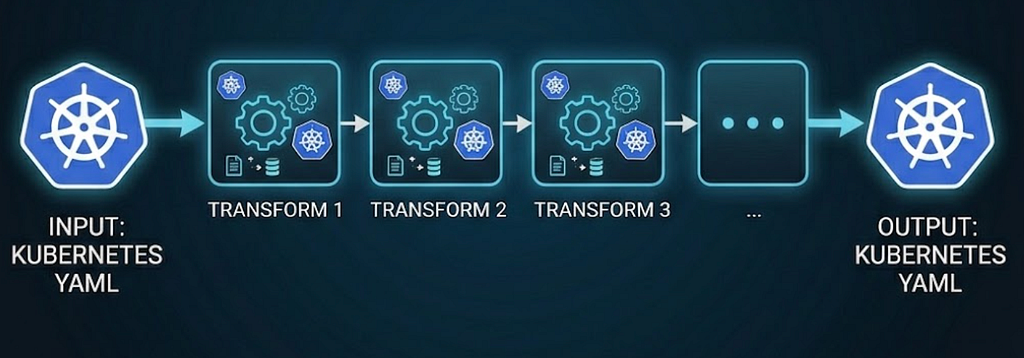
I recently wrote about the backgrounds of kustomize and kpt, and about a new package installer I created that uses kustomize and ConfigHub functions as kustomize transformer plugins under the hood. These tools manipulate configuration as data using sequences of transformations on the data. They are Kubernetes configuration transformation orchestrators.
The orchestrator makes it possible to compose multiple function executions without generating code to call each function on the same configuration data payload(s). The combination of the orchestrator and function SDK help with loading and storing configuration data, unmarshaling and re-marshaling the data, sequencing function executions (e.g., invoking mutating functions before validating functions), either fetching the function implementations (in the case of containers) or calling out to function servers (in the case of ConfigHub custom workers), selecting resources to invoke functions on, normalizing the configuration data, preserving comments, recording metadata, computing function arguments, validating function arguments, etc.
Kustomize, kpt, and the installer execute linear pipelines of transformation functions. They take Kubernetes YAML (KRM) as input, along with some parameter values from kustomization.yaml, Kptfile, or installer inputs and/or facts, and produce Kubernetes YAML as output. Kustomize and the installer transform DRY configuration out of place, with the output distinct from the input, and kpt and ConfigHub transform WET configuration in place.
Kpt generally takes function inputs from ConfigMaps. For example:
pipeline:
  mutators:
    - name: set-tier-label
      image: set-labels:latest
      configMap:
        tier: mysql
This works fine for the common case where values are provided as inputs and propagated by functions to all destinations in the configuration where they are needed, independently by every pipeline step.
You may be wondering how that is better than template variables, kustomize vars, or kpt setters.
First, that’s not the main point of the transformation approach. The objective is to unblock the capabilities that configuration as data enables, such as the ability to build interoperable applications on top of the configuration data as easily as for live clusters, make mass changes to configuration, automatically incorporate changes made to the live state, and generate configuration without being wedded to a specific generation format forever. For these approaches to work, it’s important for the configuration to be expressed using standard Kubernetes APIs (and popular CRDs), with no special markup syntax.
Second, input values are often not pure inputs, but come from somewhere else that are the authoritative sources, which may change independently of the configuration fields that consume the values. Restating them as a independent variable values creates a another source of truth and a drift risk. The values may also be derived from other values rather than just copied verbatim. And the values may be needed in multiple locations that could be determined programmatically, instead of a person needing to carefully wire them throughout the configuration or review the work of an AI agent that did that. Transformation functions are particularly suitable for such cases.
Third, I find that the transformation approach does have a number of direct benefits, such as mitigating parameter proliferation, making the configuration more readable, enabling it to be validated directly, and decoupling phases of customization, such as configuration authoring-time decisions, installation-time decisions, post-installation customization, making cross-cutting changes like injecting sidecar containers, variant creation, and operational changes, like performing rollouts and tuning resources and probe thresholds. Of course, there’s also the common use case for kustomize of patching upstream configuration without forking it. And the case of generating ConfigMaps. Embedding application configuration files as multi-line strings in ConfigMaps and templating that has many disadvantages: inability to directly validate the configuration, lack of IDE syntax highlighting and indentation, lack of ability to use it directly in local execution, obfuscation, etc.
With respect to the second point, in order to extract, transform, and propagate values, it can be useful to be able to chain multiple functions together so that customization logic can be decomposed into more reusable functions. In kustomize and kpt, transformer functions don’t pass values to each other directly, but it is possible to write values to known locations in one function and read them from another function. An example would be to hash ConfigMaps, store the values in annotations, and then propagate the hashes to uses of the ConfigMaps in order to trigger rollouts on changes. ConfigHub has built-in functions that do this (e.g., set-hash), but functions could be written to do this in kpt by using Starlark, Go, or Typescript. For brevity, I’ll omit the function code, but the pipeline would look something like this:
  pipeline:
    mutators:
      # Stage 1: derive the value and park it where stage 2 can read it.
      - name: extract-config-hash
        image: gcr.io/kpt-fn/starlark:v0.5
        configPath: extract-config-hash.yaml
      # Stage 2: relational propagation.
      - name: stamp-consumers
        image: gcr.io/kpt-fn/starlark:v0.5
        configPath: stamp-consumers.yaml
To propagate values between functions that weren’t written to be paired in this way, one would need to insert ApplyReplacements functions in between them to transfer values from the fields where values were written to fields from which they would be read.
Crossplane composition functions, which were at least partly inspired by KRM functions, similarly execute in a pipeline, though its patch-and-transform function and krofunction are pretty expressive. The patch-and-transform function is more powerful than apply-replacements, such as being able to combine multiple values in formatted string expressions. The kro function supports CEL expressions that refer to resource fields, including runtime status fields, in function arguments.
Typical AWS example where many resources require the VPC ID:
...
  pipeline:
  - step: kro
    functionRef:
      name: function-kro
    input:
      apiVersion: kro.fn.crossplane.io/v1alpha1
      kind: ResourceGraph
      status:
        vpcId: ${vpc.status.atProvider.id}
      resources:
...
      - id: subnet
        template:
          apiVersion: ec2.aws.upbound.io/v1beta1
          kind: Subnet
          spec:
            forProvider:
              region: ${schema.spec.region}
              vpcId: ${vpc.status.atProvider.id}
              cidrBlock: "10.0.1.0/24"
Crossplane compositions aren’t applied to configuration data outside the cluster, so this is not strictly a configuration transformation, but I included them due to the similarity and because the patterns could be adapted to kustomize, kpt, and ConfigHub.
Like the Crossplane functions, ConfigHub’s TransformPaths Links can combine and transform configuration values, using Go templates or CEL expressions. They can also pass values between functions. ConfigHub functions can extract values as well as transform configuration data, and those two types of functions can be used together, as well as with path specifications. That can be useful in situations requiring complex resource matching or path searching, for instance.
Here’s a simpler example:
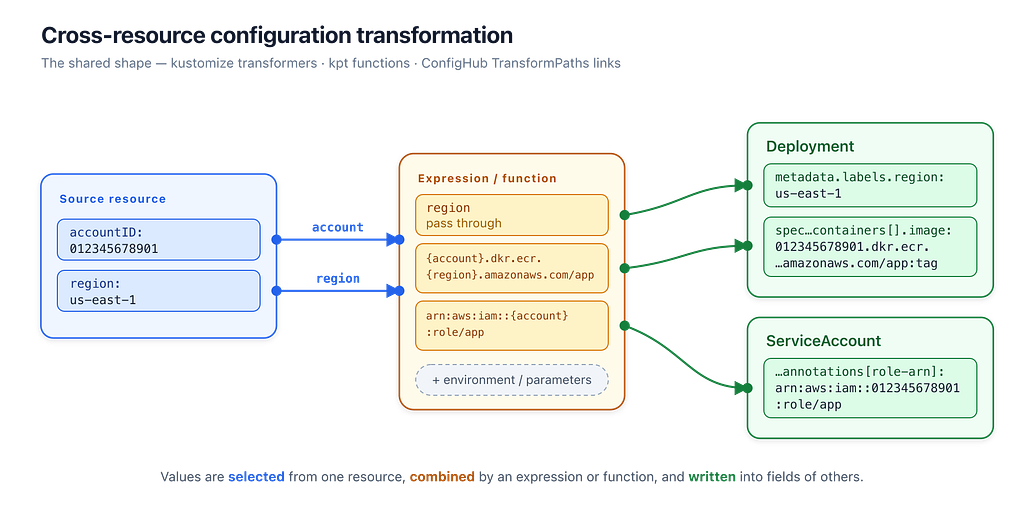
In an AWS environment the account ID and Region should be authoritative in one place — say, an AWSProfile custom resource the platform team maintains per environment — and many resources need values constructed from them. A workload’s container image lives in that account’s ECR registry (<account>.dkr.ecr.<region>.amazonaws.com/<repo>) and its ServiceAccount is bound to an IRSA role (arn:aws:iam::<account>:role/<name>).
apiVersion: cloud.example.com/v1
kind: AWSProfile
metadata:
  name: prod
  annotations:
    config.kubernetes.io/local-config: "true"
spec:
  accountID: "012345678901"
  region: us-east-1
A downstream orders unit contains the Deployment and its ServiceAccount. The link reads the account ID and Region and writes three derived values: a Region label (a per-path write), the ECR repository URI (preserving the existing tag), and the IRSA role-ARN annotation:
UpstreamPaths:
  - Name: accountID
    Path: spec.accountID
    Resource:
      ResourceName: /prod
      ResourceType: cloud.example.com/v1/AWSProfile
  - Name: region
    Path: spec.region
    Resource:
      ResourceName: /prod
      ResourceType: cloud.example.com/v1/AWSProfile
DownstreamPaths:
  - Path: metadata.labels.aws-region
    Resource:
      ResourceName: default/orders
      ResourceType: apps/v1/Deployment
    Expression: "{{.Params.region}}"
    Evaluator: template
    Parameters: [region]
    DataType: string
DownstreamSetters:
  # Point the container at this environment's ECR registry, keeping its tag.
  - Parameters: [accountID, region]
    FunctionInvocation:
      FunctionName: set-container-repository-uri
      WhereResource: "ConfigHub.ResourceType = 'apps/v1/Deployment'"
      Arguments:
        - Value: orders
        - Value: "{{.Params.accountID}}.dkr.ecr.{{.Params.region}}.amazonaws.com/orders"
          Evaluator: template
  # Bind the ServiceAccount to its IRSA role, illustrating the set-yq setter.
  - Parameters: [accountID]
    FunctionInvocation:
      FunctionName: set-yq
      WhereResource: "ConfigHub.ResourceType = 'v1/ServiceAccount'"
      Arguments:
        - Value: '.metadata.annotations["eks.amazonaws.com/role-arn"] = $params.arn'
        - Value: "arn=arn:aws:iam::{{.Params.accountID}}:role/orders"
          Evaluator: template
More generally, Links in ConfigHub can propagate and transform configuration data in whole or in part from one Unit containing Kubernetes resources or application configuration (INI, TOML, JSON, Env, etc.) to another. For instance, we use Upsert links with the render-configmap transformation function to generate ConfigMaps for application configuration, and Insert links to insert AWS IAM policy JSON into ACK resources.
Triggers in ConfigHub is another mechanism that executes functions on configuration. Triggers are similar to Kubernetes dynamic admission control. They can execute functions after every configuration change. Mutating functions are executed before validating functions and other readonly functions. Mutating function Triggers can maintain invariants. Validating function Triggers can verify correctness and completeness of the configuration, and can enforce policies. Readonly function Triggers can extract values for filters and views and ensure they are kept up to date. ConfigHub ensures that mutating functions are executed first and that functions are executed by the correct worker.
Hopefully that gives you a sense of the capabilities and limitations of current Kubernetes configuration transformation orchestrators. Anything that could be done in a general-purpose language, such as using cdk8s, or configuration DSL, such as jsonnet, can be done using transformation functions, but they are composed through data instead of through code, and can interoperate with other tools that read and write the configuration data. Also, in the case of kpt, porch, and ConfigHub, because the data is stored persistently, it does not need to be regenerated from scratch for every change. That enables transformations to be decoupled across time as well.
We’ll share more examples as we find good ones that better illustrate how the approach changes the experience of maintaining Kubernetes configuration.
Have you written a kustomize transformer plugin, KRM function, or Crossplane composition function? What do you like or not like about writing transformations? Have you used AI agents to write transformations? What do you like or not like about using them? Have you tried to use yq as a transformation function? Do you use transformation functions so that you can keep the configuration fully rendered / WET in order to enable some other capability?
Reply here, or send me a message on LinkedIn, X/Twitter, or Bluesky, where I plan to crosspost this.
You could also try out ConfigHub, which is now in preview.
If you found this interesting, you may be interested in other posts in my Kubernetes series.