
In my previous post, I wrote about my new kustomize-based installer, which also integrates with kpt. Kustomize, Kpt, and Porch are three configuration as data tools for Kubernetes that I previously created before ConfigHub. I already wrote a post on the origins of Kustomize, so I’m not going to rehash that, and hopefully you are already at least somewhat familiar with Kustomize, but I will discuss the challenges and gaps with Kustomize that led to the creation of the other tools and, ultimately, to ConfigHub.
apiVersion: kustomize.config.k8s.io/v1beta1
kind: Kustomization
metadata:
name: hello
resources:
- deployment.yaml
- service.yaml
- ingress.yaml
- configmap.yaml
commonLabels:
app: hello
images:
- name: hello
newTag: v42
I wrote the rationale for kpt, which explains more about the concept of configuration as data than the rationale for kpt itself. However, it does touch on the motivation that kpt was intended to fill gaps with kustomize, much as kustomize intended to fill gaps in kubectl.
One such gap was that we wanted a simple mechanism to package sample configurations for Kubernetes (e.g., guestbook), GKE (e.g., microservices demo), and Anthos (e.g., Bank of Anthos) without taking on Helm as a dependency and without adding packaging to kustomize, due to scope concerns. Kustomize supports remote bases and rendering remote configuration, but it doesn’t facilitate pulling a copy of the original configuration.
The core mechanic of kpt’s package functionality is based on the observation that many git-based package tools host multiple packages in a single git repository, but git itself doesn’t provide very usable mechanisms for interacting with subdirectories in a repository (partial clone, sparse checkout). kpt is able to do that, making any existing folder of Kubernetes YAML implicitly gettable as a kpt package.
% kpt pkg get https://github.com/kubernetes/examples.git/web/guestbook/all-in-one@master
In addition to packaging, the kpt live command group added more robust pruning than what kubectl provides, and the ability to wait for the applied resources to become ready, using kstatus. Since then, kstatus was adopted by Helm 4, and Flux integrated a fork of kstatus. By this time, GitOps tools have been widely adopted, but back in 2019 or so that was not the case, and the lack of a robust applier with pruning and status checking was considered a hindrance to adoption of kustomize and all other alternatives to Helm templates. Moreover, we hoped to eventually integrate the functionality into kubectl to make kubectl itself more usable.
% kpt live apply hello
A third motivation was that the policy controller team wanted to be able to run OPA Gatekeeper over rendered configuration to validate it and enforce policies in CI. This was the initial driving motivation for the creation of KRM functions. That effort merged with the kpt effort, bringing functions to kpt.
apiVersion: kpt.dev/v1
kind: Kptfile
metadata:
name: hello
pipeline:
validators:
- image: ghcr.io/kptdev/krm-functions-catalog/kubeconform:latest
- image: ghcr.io/kptdev/krm-functions-catalog/gatekeeper:latest
Originally I imagined kpt would complement kustomize, but there were several challenges to that. For example, support for remote bases in kustomize and common kustomization patterns made kustomization trees frequently not self-contained. Also, the addition of functions to kpt created overlap with kustomize transformer plugins. Additionally, since kustomize was integrated into kubectl, it was problematic to integrate the apply functionality into kustomize.
There was an effort to try to converge kpt and kustomize. A result was that validators, KRM functions, localize, and cfg configuration viewing commands were added to kustomize.
What really made kpt distinct, though, was the departure on how it handled variants, which also relates to one of the primary areas of criticism of kustomize: the challenges with patches.
resources:
- ../../base
patches:
- path: patch.yaml
- path: healthcheck_patch.yaml
- path: memorylimit_patch.yaml
Kustomize generates variants of a base configuration by performing out-of-place transformations (i.e., rendering its output without modifying the base resource files), mostly notably patching. The patches, which can be strategic merge patches (aka overlays) or JSON patches, are generally written and maintained by hand, which itself is one challenge. The patches are targeted by resource types and names, and specific field paths (using merge keys in the case of an overlay) or selectors. This can make patches brittle and refactoring difficult, similar to git merge conflicts. The final configuration can also be difficult to reason about when there are multiple layers of patches.
# ingress_patch.yaml
- op: add
path: /spec/rules/0/http/paths/-
value:
path: '/example'
backend:
serviceName: hello
servicePort: 5555
...
# kustomization.yaml
- path: ingress_patch.yaml
target:
group: networking.k8s.io
version: v1
kind: Ingress
name: hello
The replacements transformer is similar to a patch, but decouples the value source, which makes it more of a repeatable transformation engine than a one-off patch. It was introduced in order to obviate the need for the parameter-like vars feature. It shares most of the challenges with patches, however. It’s also too limited for some kinds of substitutions, which could be addressed by other transformers/functions, where necessary.
replacements:
- source:
kind: Service
labelSelector: "environment=production,tier=frontend"
fieldPath: metadata.name
targets:
- select:
kind: Ingress
name: hello
fieldPaths:
- spec.rules.0.http.paths.0.backend.service.name
Both patches and templates are simple when there are only a few values that need to be customized in different variants, but they both become complicated when many values need to be changed. Patches can be simpler for the case where different variants need to change different values. Templates can be simpler when different variants need to change the same values. Kustomize’s built-in transformers were intended to address the most common such cases, such as changing images, but there aren’t specific transformers available for most Kubernetes resource fields. More powerful generators, such as DSLs and general-purpose programming languages, can express powerful logic, when necessary, but they don’t significantly improve the experience of exposing lots of input parameters read from a file, come with a learning curve (especially with DSLs), and don’t solve fundamental issues with configuration as code, such as the need for flexibility driving complexity, lack of interoperability, configuration drift, blast radius, and sprawl.
Kpt is a package tool that represents configuration as always fully rendered / WET YAML and facilitates forking of base packages by supporting merging of updates, automatically deriving patches. This solved a couple of the challenges: there’s no need to write and maintain patches, and the configuration is always clear. Kpt supports multiple merge strategies, but conflicts are, of course, still possible, especially when whomever is maintaining a package is not also aware of the impact of changes on downstream variants of it.
Kpt emphasizes use of functions for transformations more than Kustomize emphasizes transformer plugins, for which there’s barely any documentation. Moreover, it enables functions to be invoked imperatively, while recording the result declaratively, since the configuration data is persisted in git. Kustomize’s imperative editing experience is limited to changing the kustomization.yaml file with the edit command. The kubectl patch --local command modifies resources in files locally, which can be handy. I also use kubectl create --dry-run=client -o yaml to create resources. I added a new command to the installer to do this more cleanly and extensibly.
A challenge with Kpt was that managing many WET variants required more orchestration to keep all of the variants up to date with upstream changes via kpt pkg update and to invoke functions on multiple variants via kpt fn render and kpt fn eval. Additionally, the number of git and kpt pkg operations required even to update a single variant made the experience fairly tedious.
# Create a package
% cd $upstream_dir
% kpt pkg init .
% git add . && git commit -m "init base package" && git push

# Create a downstream variant
% cd $downstream_dir
% kpt pkg get "$upstream_dir"
% git add . && git commit -m "clone base into variant" && git push

# Change upstream
% cd $upstream_dir
% $EDITOR deployment.yaml
% git add . && git commit -m "edited the base" && git push

# Update downstream
% cd $downstream_dir
% kpt pkg update .
% git add . && git commit -m "update downstream" && git push
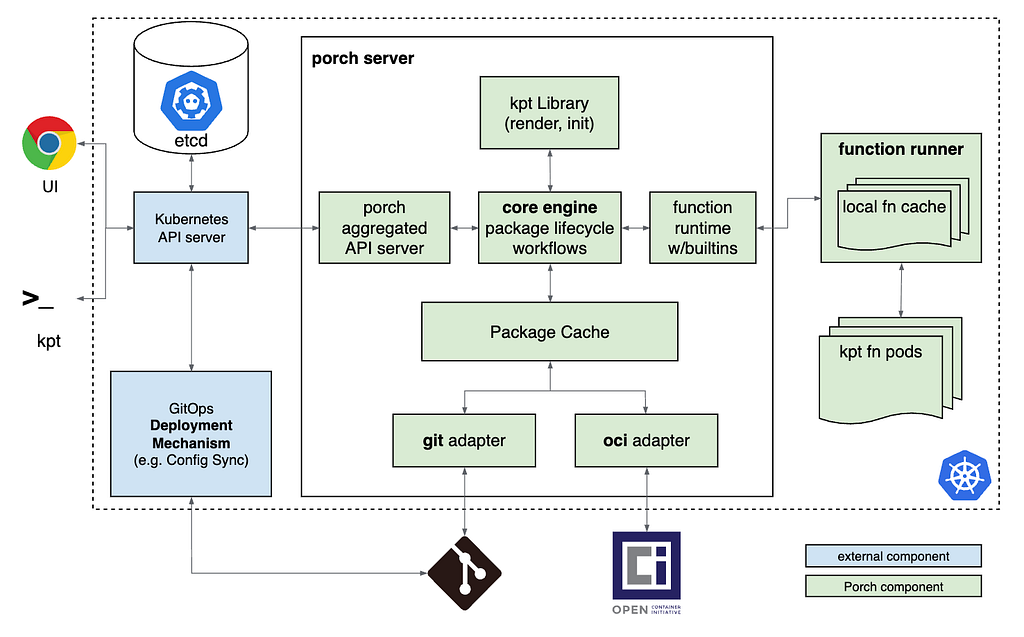
This gave birth to Porch, the package orchestrator, which was spawned from a one-month prototyping effort (demo of the prototype). Porch provided an API layer over Kpt and git. That made it possible to read and write Kubernetes configuration and to invoke functions via Kubernetes APIs. The Go function catalog was built into Porch, rather than invoked as individual containers, in order to achieve interactive performance.
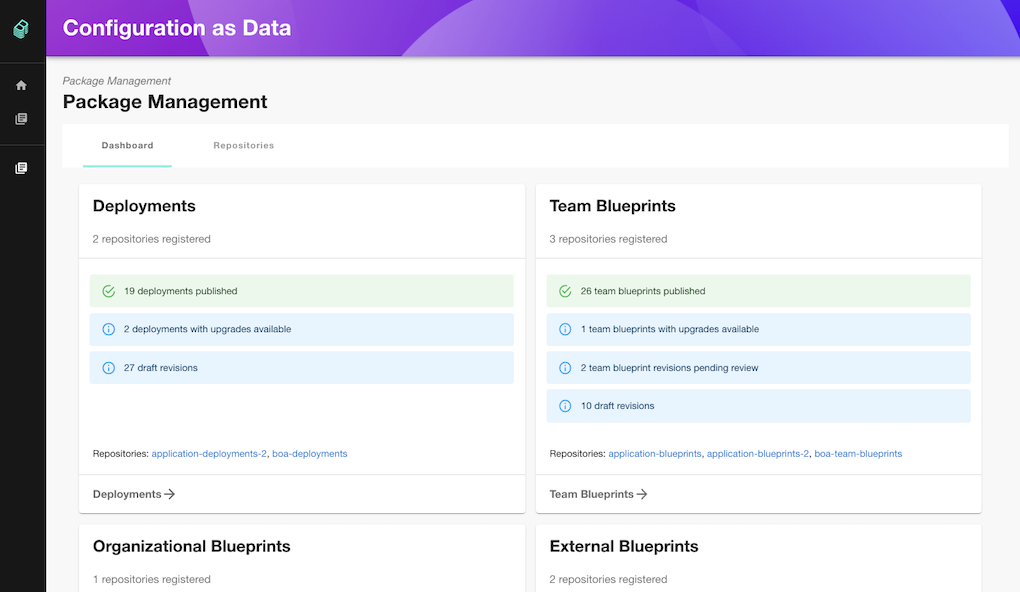
The Backstage GUI (repo) used the KRM function interface to change the configuration and save it back to git automatically. This enabled ClickOps backed by GitOps.
I thought Porch was promising, but my responsibilities shifted and I had to focus elsewhere. Porch initially became part of the Nephio project, but it looks like it has been reunited with the Kpt project recently.
That brings me to ConfigHub. I started where I left off with Porch, but a clean slate allowed several different choices, such as:
-
Kpt and Porch store the configuration as “code”, in git, and that’s core to how they work. ConfigHub stores configuration as data, in a database. This facilitates centralized, shared access to the configuration via an API, makes it queryable, mitigates sprawl, and has several other benefits. We’ll write another post on why we don’t store configuration in git.
-
ConfigHub supports richer relationships between variants and dependencies. The relationships between variants make it easier to reason about upstream and downstream relationships and to promote changes. The relationships between dependencies simplify propagation of values between resources. The links that represent dependencies can also include associated computation for transforming data from upstream configurations for insertion into downstream configurations.
-
ConfigHub stores more metadata about changes, which is used to control merge behavior at a fine-grained level, in addition to providing more value provenance information in more detail than what git records on its own.
-
ConfigHub decouples automated function invocations (Triggers) from configuration data, with different trigger events to distinguish variant creation and admission control. Kpt’s function pipelines were overloaded for multiple purposes without distinguishing them.
-
ConfigHub supports non-KRM configuration formats. For example, it enables reading and writing application configuration (TOML, INI, JSON, etc.) in its native representation. This was not solved in Kpt, which has an “everything is a Kubernetes resource” model.
-
ConfigHub changed the function execution model, so that functions are hosted by an executor, including a built-in executor, rather than individual containers or executables. Even without additional optimization, this makes function “packaging” less granular and function execution faster.
-
Neither ConfigHub nor the installer support problematic features of kpt, such as setters and nested packages.
The ConfigHub function executor and function catalog are open source, if you’re curious how they work and/or what functions are available. The functions can be executed locally via the installer as a Kustomize transformer plugin and also imperatively using cub function local.
Hopefully that gives you some insight into how these tools are tools are different from one another and why each was created. Which one is better depends on your use case, constraints, level of familiarity with the tools, and other factors. I’ll dive deeper into ConfigHub in future posts.
If you are dissatisfied with the Kubernetes configuration customization tool(s) you are currently using, I suggest giving ConfigHub a try. It’s currently in preview. We’re looking for feedback, actively working to improve ConfigHub, and still have the flexibility to make changes.
Feel free to email us at hello@confighub.com, or send me a message on LinkedIn, X/Twitter, or Bluesky.
If you found this interesting, you may be interested in other posts in my Kubernetes series.