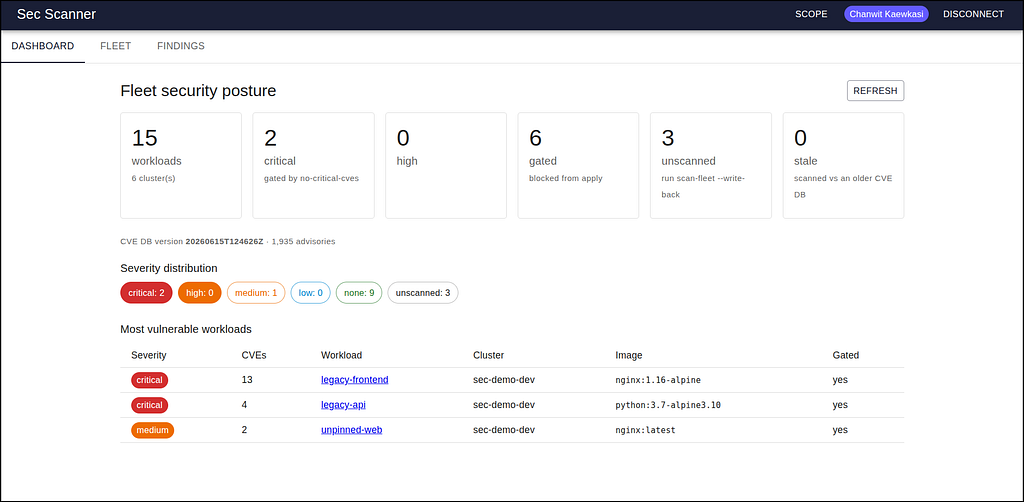
If you’re following Brian Grant’s blog post series, his recent one was about building an RBAC manager on top of ConfigHub. This post builds a different tool — a container vulnerability scanner with a Web console on the same foundation, and reuses most of his RBAC manager to do it. The tool answers a common requirement.
“Show me every image we run, across every cluster, and tell me which ones have known CVEs. And stop the bad ones from shipping.”
Normally, that’s a scanner, a database, a service to glue them together, a UI, auth, a validation layer.
On ConfigHub, the work that usually dominates a tool like this — inventory, state, validator, the API — was already done. What was left was the part specific to CVEs. Once you’ve built one app on ConfigHub, the next is mostly a domain swap. Yup, we now have Brian’s RBAC Manager to copy :-) This post shows where the swap happens to it to build a CVE tool.
Let me show you what that means.
Configuration as Data makes new kinds of config tools feasible
ConfigHub’s core is to treat configuration as data, not as templates in a Git tree. A Kubernetes Deployment isn’t a YAML file you render, it’s a Unit: a versioned, queryable, gate-able object living in a Space, reachable through a real API. The image reference inside it isn’t a string, it’s a field path you can query across the whole fleet with a where clause, the same way you’d query a database.
This changes parts of the tool that are hard to build. “Every image across every cluster” stops being a discovery problem (scrape the clusters, reconcile the drift, build an inventory service) and becomes a database-like query:
cub unit list --space "*" \
--where-data "spec.template.spec.containers.*.image ~ 'nginx:1.16-alpine'"
“Stop the vulnerable ones from shipping” stops being an admission-controller project and becomes a Trigger that attaches an Apply Gate when a Unit’s data fails a check. And “where do we store the scan result?” The question that requires a second database for this has a simpler answer: store the result on the Unit, as data, next to the config it describes.
When config, policy, and the scan result is data, a tool like this no longer needs a backend of its own. It is a view over ConfigHub plus some domain logic . This is the same point Brian made about his RBAC Manager: once configuration has an API and lives in a database, a whole class of config-management tools, like this one, suddenly feasible to build.
What sec-scanner actually does
-
A unified CVE database. We pulled vulnerability data from three upstream sources (the GitHub Advisory Database, the official CVE List V5, and OSV.dev’s ecosystem exports) and normalized all of them into a single SQLite file accessed through a pure-Go driver.
-
A custom scanner. A small, self-contained Go binary that does what a scanner does, in the open: it pulls an image’s layers via the crane lib and flattens them in-process, read the OS package database straight out of the tar stream (
/lib/apk/db/installedfor Alpine,/var/lib/dpkg/statusfor Debian), and match each package against the CVE database. It happens to be good enough to find real CVEs in real images. Of course, you can use image scanners like Trivy and others to do the same. -
The ConfigHub integration. The scanner reads image references from the fleet (
secscan inventory), scans them, and writes the verdict back onto each Unit: the gate signal (max-severity,cve-count) plus scan provenance (scanned-at,cvedb-version) as annotations, and the full findings as an AppConfig/YAML record Unit. A no-critical-cves Trigger then gates any Unit annotatedCRITICAL. Config and verdict are the same versioned object; policy is a gate on that object.
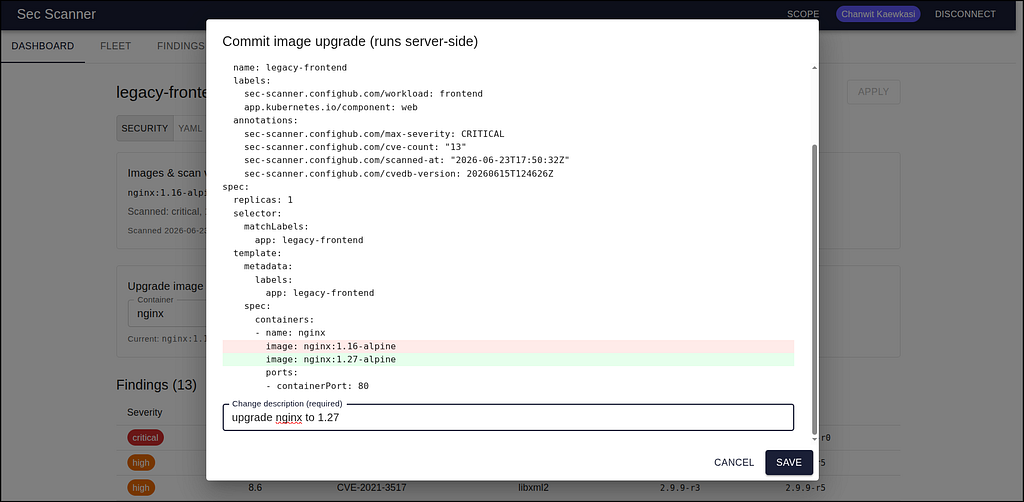
We validated the whole thing against the ConfigHub Cloud: seed the fleet, scan the images, write the verdicts back, and watch the gates attach. Forty-three assertions, all green, including the one that matters most: the scanner wrote max-severity=CRITICAL onto legacy-frontend, and the no-critical-cves guardrail blocked it from ever being applied. Nobody wrote an admission webhook. The gate is just a check on data.
That covers the backend. The rest is about the Web console.
The app in an afternoon
We wanted a real Web console: a dashboard, a fleet inventory, a findings list, per-workload detail, and the ability to act (upgrade a vulnerable image right from the UI).
As I said in the intro, I didn’t build it from scratch. We had already built a different ConfigHub app — RBAC Manager, a console for managing Kubernetes RBAC as data. So we opened it up and asked a simple question: how much of this is about RBAC, and how much is just “a React app talking to ConfigHub”?
Almost none of it was about RBAC.
Here’s the rbac-manager source tree, sorted into two piles. The first pile is pure scaffolding — domain-agnostic, copy it verbatim:
-
sdk/— the vendored ConfigHub SDK (a generated RTK Query client) and a thin fork of its base client that adds bearer-token auth for local dev. -
api/— tiny helpers: a Redux store, a raw-text fetcher for the data endpoints. -
auth/AuthGate.tsx— blocks the app until a ConfigHub identity is established (session cookie or a pasted token), then renders the shell. -
fleet/scope.ts,fleet/SnapshotContext.tsx— a user-configurable analysis scope (filter expressions over Spaces and Targets) and a shared, lazily-loaded snapshot of the fleet. -
main.tsx,vite.config.ts— the entry point and a dev proxy that forwards/apiand/authto ConfigHub so the browser sees a single origin (the same shape the production nginx container uses).
The second pile is domain logic — the only part you actually rewrite:
-
fleet/snapshot.ts— how you extract resources from the fleet. -
the model files — what your domain objects are.
-
the pages — how you render and edit them.
So we asked Claude to copy the first pile wholesale and replaced the second. Concretely:
The snapshot. rbac-manager’s snapshot loader calls get-resources server-side to pull RBAC kinds out of every Unit. We changed two where clauses — kind = 'Deployment', ResourceType = 'apps/v1/Deployment' — and parsed images and scan annotations out of the result instead of roles and bindings. The scoping logic, the parallel fetch, the gate/warning join — all untouched. The function-invocation API doesn’t care whether you’re asking about RBAC or images; get-resources returns whatever the where clause selects.
The model. We wrote ~150 lines: a Severity type with an ordering and a color, a Workload type, and a function to read the scan verdict off a Deployment’s annotations. That’s the entire domain.
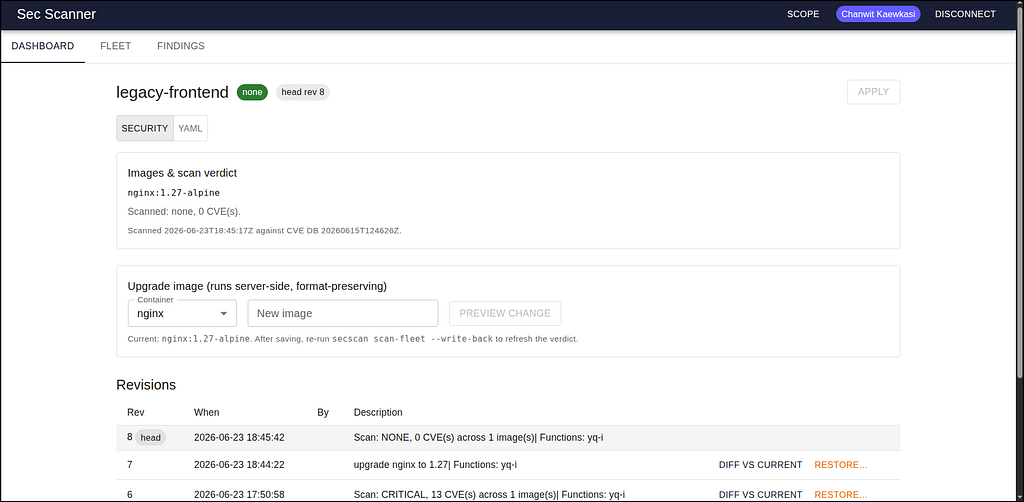
The pages. Four of them: Dashboard, Fleet, Findings, Unit — built from the same UI components RBAC manager uses. The Unit page was the only interesting one, because it writes, and even there we copied RBAC manager’s pattern exactly: a structured edit compiled to a server-side yq-i expression, dry-run-previewed as a diff, then committed with a required change description. We swapped “add a verb to a role” for “repin a container’s image” — a different one-line yq expression — and got back image upgrades, revision history, and rollback for free.
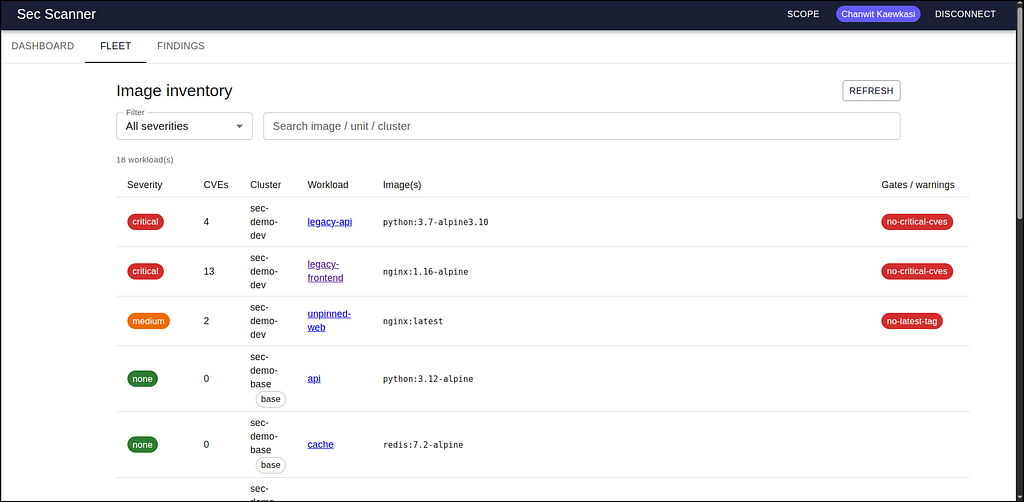
The numbers tell the story. Of the app’s ~25 source files, we touched the model (3 new files, ~250 lines), the snapshot (2 changed clauses), and the pages (~700 lines of mostly-mechanical MUI tables). Everything underneath — auth, the API client, the store, the scope system, the dev proxy, the deployment container — we renamed and shipped. tsc clean, production build clean, dev server serving against the live prod API on the first try.
To show per-CVE details in the UI, the only backend change needed was to have the scanner write the full findings as data — an AppConfig/YAML record Unit for all workloads in the Space. The UI reads it straight from the ConfigHub API. No new endpoint. No new service. The app has no backend of its own, because ConfigHub is the backend.
And it isn’t read-only. Because Configuration is Data, the same API that surfaces a finding can fix it — repin the image, patch the Unit — and the change flows through ConfigHub. A reporting tool tells you what’s wrong; this one closes the loop on the same object, with full revision history.
The pattern, generalized
Strip away the security specifics and here’s the reusable recipe for building an app around ConfigHub:
-
Decide what “your object” is. It’s some kind of resource living in ConfigHub Units — Deployments, Services, Roles, ConfigMaps, whatever. Write a small model that parses it out of a resource document.
-
Load a fleet snapshot. Call
invoke-functions-on-orgwithget-resourcesand awhereclause that selects your kind, in parallel with a unit list for gates/warnings/metadata. This is ~150 lines you copy and adjust two strings in. -
Render views. Dashboard, inventory, detail. These are just tables over the snapshot. The data is already there; you’re choosing how to show it.
-
Act through the API. Every mutation is either a whole-Unit update or a server-side function invocation (
yq-i,set-image, a validator). You compile the user’s intent to an expression, dry-run it for a preview diff, and commit it with a change description. ConfigHub records the revision, re-evaluates the gates, and preserves comments and formatting — you don’t re-serialize anything in the browser. -
Let policy live in ConfigHub. Your app doesn’t enforce rules; it surfaces them. Triggers and Apply Gates do the enforcing, fleet-wide, whether the change came from your app, the CLI, or CI.
That’s it. The auth, the scoping, the proxying, the token handling, the diff viewer, the change dialog — those are solved once and copied forever.
Where the time actually goes
It’s worth being precise about where the time savings come from, because “reuse a template” is true of any framework and isn’t the interesting claim.
The interesting claim is that ConfigHub eliminates the categories of work that normally dominate an internal tool. You don’t build an inventory service, because the fleet is already queryable. You don’t build a state store for scan results, because results go back onto the Unit. You don’t build an enforcement layer, because gates are first-class. You don’t build a custom API, because the SDK exposes everything — list, get, invoke functions, patch, apply, approve, and revisions.
What’s left is the part you actually wanted to write: the meaning of your domain, and how to show it. For sec-scanner that was severity buckets, an inventory table, a findings list, and an image-upgrade button. For the next app it’ll be something else — but it’ll be only that.
The takeaway
We set out to validate a scanner and ended up demonstrating something more useful at the Fleet-level: that ConfigHub is a platform you build on, not just a system you operate — and that the tools you build on it can fix what they find, not just report it.
The config-as-data thesis isn’t only about avoiding template sprawl in your deployments. It’s about what becomes possible once your configuration is queryable, mutable, gate-able, and reachable through a real API — namely, that purpose-built internal tools stop being quarter-long projects and start being afternoon projects.
The sec-scanner example ships all of it: the unified CVE database, the custom scanner, the guardrails, and the Web console for Fleet. But the part worth stealing isn’t the security logic. It’s the shape. Open the app/ directory, notice how little of it knows what RBAC or CVEs are, and copy the rest.
Your next internal tool is a model, where clauses, and a handful of queries. What would you build?
Questions or feedback? Email us at hello@confighub.com.