
Part 5 of a series.
When you add an app to your phone, you install it from the app store. Then you make it yours: your friends, your contacts, your settings. When the app updates, you do not lose any of that, because your data is kept separately from the app itself. The update replaces the app and leaves your data alone. This is also true for any customisation and configuration data.
Installing an app with Helm does not work this way. Your customisations and the package are the same thing, so an upgrade can quietly overwrite them, and it can be hard to say where your configuration actually lives at all, and what it is. We want to fix that.
Quick Intro: HELM
Helm renders your configuration at deploy time and does not keep the result. But that result is what your cluster actually runs.
Much operational pain follows from this. You cannot look up what was deployed last month, see what a change will touch before it ships, or make a change that survives the next chart upgrade.
The fix is to render once, keep the output in a store, and make changes there. Charts and values files stay exactly as they are, and so does Argo or Flux.
People say they want to keep Helm charts. What we want to replace is the operational model around Helm, which today is different for every chart and every team. Yikes!
What we need: One way to install, change, upgrade, promote and roll back, whatever the chart.
Rendering early is not a new idea. The Rendered Manifests Pattern, sourceHydrator, Kargo and Gitless GitOps all do it. They keep the output as files, however files hold no durable relationships between environments and may be replaced by the next render. We’ll fix some of this.
We use OCI a lot. Our store is “OCI in and OCI out” so it fits any standard container pipeline without a migration.
Rendered objects are not the whole story. In Helm, Hooks, CRD ordering, setup jobs and prerequisites are imperative, depend on the context of the render, and are not safely repeatable. Running an imperative sequence once, at install, is tolerable. Running one on every upgrade is not, because nobody can say what state you are in if it stops halfway. What we can do here is make explicit upfront choices for each supported configuration, recording use cases (or ‘playbooks’), and automate that for you (and AI).
This gets us a ‘99% solution’. Most of what a chart does can be settled once, when the package is built, and checked then. The number of settings left open at install time should be small, though never zero, and that small set should carry its own schema saying how it may be set. Doing this chart by chart is real work, and it is exactly the kind of work an AI can do well, and record. So we can give you a catalog of working charts and examples.
Agents make this urgent. A person fills the gaps with memory and colleagues. An agent has neither, so it proposes changes against configuration it has never seen.
Try it today. Pick a chart. Run helm template for two environments, keep the outputs and diff the results. Do you see any surprises in the diff? We shall talk about why and how to address those below. And in our next post we’ll get super practical on the ConfigHub Tutorial.
Onwards!
WHERE is my real config?
Imagine a week with Helm. Your setup is solid. Charts are pinned by version, values files per environment, every change flows through a PR, with Argo or Flux reconciling in the cluster.
Monday. Dependency update. Your ingress chart goes from 4.9 to 4.10. The PR is a one line version bump, approved and merged. What actually changed on the clusters was 900 lines of rendered YAML: new probes, labels, a sidecar. You can produce that diff if you have set it up, with helm-diff or by rendering both versions in CI. But it is computed at review time from the chart and the values, so it is only as good as the re-render, and it disappears when the job finishes. 900 lines a lot to review and record what changed.
Tuesday. Security audit. “What exactly was running in prod-eu on the 14th of last month?” There is no place to look that up. Someone checks out the commit from the 14th, re-renders the chart, with the Helm version the tooling had then, not now, and submits the output with the comment: “sorry but this is our best reconstruction”.
Wednesday. You raise a shared timeout in the base values. Tested, reviewed, merged. Three weeks later you learn prod-eu never got it: its values file has overridden that key since a migration two years ago, the override silently shadowed your fix, and nothing anywhere would have told you before shipping. The “did EU actually get it?” ticket thread runs to forty messages.
Thursday, 2:14am. There is an incident. The on-call engineer finds it: a resource limit. They edit the live Deployment; the service recovers, and everyone sleeps. At the 9am standup the graphs show a second dip at 6:40: the sync ran, the fix was reverted back to the broken value, and the record of what on-call knew at 2am is buried in a comment.
Friday. You need to set a field the chart does not expose. You try a post-renderer, and locally it works. Then you go to deploy and find that Argo CD does not support post-renderers, so now you are either rendering the chart through Kustomize or writing a config management plugin. You use an ApplicationSet, so that decision changes how configuration is rendered for every environment, not just this one. And you still have to work out how to compare what is running now with what the new pipeline will produce. All of this to set one field.
You made no mistakes this week! But it was painful. The configuration your clusters actually run, the rendered, final, real thing, exists nowhere. On Monday nobody could review it. On Tuesday nobody could look it up. On Wednesday nobody could ask what a change would touch. On Thursday we lost a key change. On Friday nobody could edit it directly. It is rebuilt from source, in memory, at every sync, trusted on faith, and thrown away.
You wouldn’t ship code this way. Nobody compiles on the production host, at deploy time, with whatever compiler is lying around, and discards the binary. You want as much traceability as possible, and cause and effect on the record, especially in the Mythos era of racing CVEs and patches. For some critical configuration data, we are still shipping source to production and compiling it there again and again.
This is what we want: build once and keep the output artifact, then configure and deploy the artifact.
WHY are we here?
Start with how the tools work today.
You write a chart and some values files. That is the source. It is small and reusable: one set of templates, one small file of differences per environment. Programmers call this style DRY, Don’t Repeat Yourself.
To deploy, a tool runs helm template, or Kustomize builds an overlay. That step is the render. It combines templates and values and produces the full set of Kubernetes objects for one environment, every field written out. Call that output WET, Write Every Time. The WET is what the cluster actually runs.
Now here is the important part. In standard GitOps, the render runs inside the deployment tool, at sync time. Argo’s repo-server and Flux’s controllers render it, cache the result, apply it, and drop that cache the next time they render. The output is not kept anywhere you can use. Git holds the source. The cluster holds the result. The rendered configuration, the thing in between, the thing you would want to review, look up, and change, is not stored anywhere.
Every pain in the week above is caused by that missing information. Monday: you cannot review a diff of files that were never saved. Tuesday: you cannot look up an old version of files that were never saved. Wednesday: you cannot ask questions of files that were never saved. Thursday and Friday: you cannot write changes into files that were never saved, so changes go to the cluster, or into patches, and the next render overwrites them.
The industry has introduced tools to address some of these issues. Many share the same conviction: the render belongs before delivery, not inside it. CI rendering, the Rendered Manifests Pattern from the Argo community, is the original. Argo CD is adding a sourceHydrator natively, where the input field is called drySource and hydrateTo can put the rendered output on a review branch first, which is the closest thing anyone has to a review gate on real objects. Kargo renders as part of promotion between stages. Flux consumes OCI artifacts directly. Gitless GitOps renders in CI and applies signed OCI, with no git in the delivery path at all. All of them save literal, fully evaluated “WET” configs; ie. better than rendering at sync time.
They differ in where the render runs and where its output goes. They agree on what the output is: files.
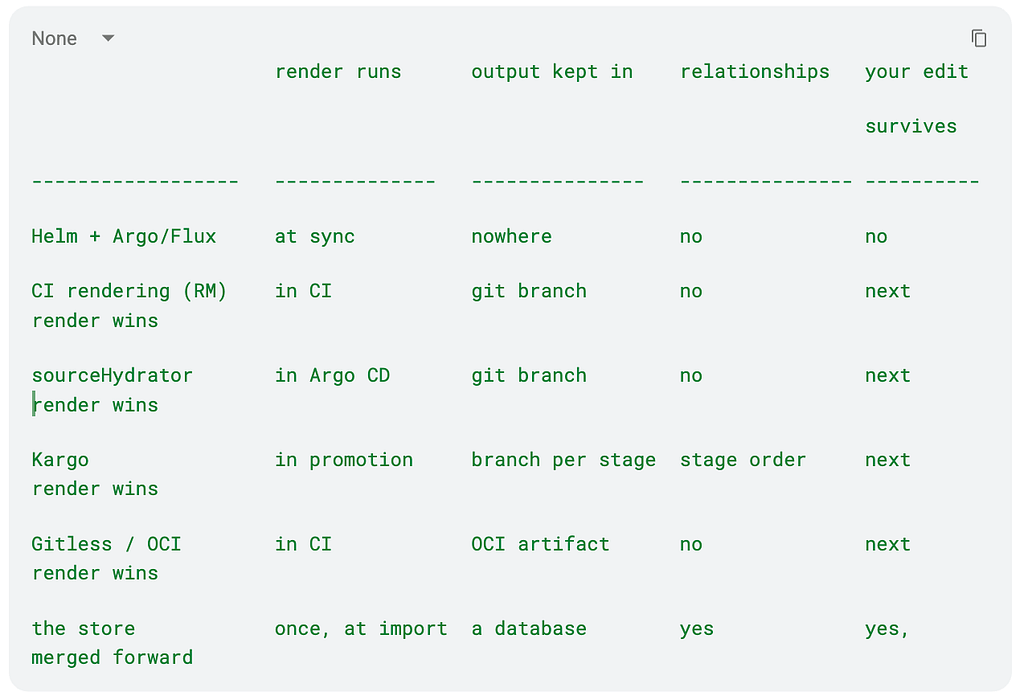
Note these problems:
-
Files hold every final value but none of the relationships between values, so the everyday questions have no direct source: which environments share this value, which override it on purpose, what would this change reach, who may change this field.
-
To answer, you need the values files, tribal knowledge, and good use of grep. Perhaps this is a reason teams keep rebuilding the same promotion, review and audit machinery in CI and around the files.
-
And a saved render is still a build product, so the next render replaces it, your edits included. That is the cause of the tracking issues on Thursday and Friday. A stored render is a cache of the source, and a cache is not a place you can safely make changes.
What you want is the opposite arrangement.
-
Store the rendered output once, then treat the stored copy as the real thing: changes are made to it directly, recorded one by one, and a chart upgrade arrives as one more change, merged with yours, instead of a rebuild that replaces everything.
-
Keep the source next to it, chart, version, values, so every stored object can say where it came from.
In short:
Build once.
Make the output artifact the record, in a config data store you can query.
Now change configuration and deployment by operating on that config data store.
In previous posts we have called this the store: a database holding a graph of config variants. More on graphs in later posts. Here we focus on Helm.
Back to the Future
Let’s try our “Helm week” again, but this time using that config data store. Same team and charts.
Monday. Your ingress chart goes from 4.9 to 4.10. The version bump arrives as a computed change against the record: 900 lines of difference, present before anything ships, and present as data rather than as a wall of text. That is the difference that matters, because a person scrolling 900 lines catches nothing, while a check that knows what a probe or a security context should look like catches the three lines that matter. What a person reviews is the summary and the exceptions, for example in this blog post showing changes validated by policy in ConfigHub.
Tuesday. “What was running in prod-eu on the 14th” is a lookup. The record holds every revision of the real thing; the auditor gets an answer, not a reconstruction.
Wednesday. Before the timeout change moves anywhere, you can see where it lands: these environments take it, prod-eu does not, because its override is recorded as a deliberate exception with a reason attached. You find that out before shipping, not three weeks later. No forty-message ticket thread.
Thursday, 2:14am. The on-call engineer’s fix is a change to the record and it has their name on it, applied from there to the cluster. The morning sync has nothing to revert, because the record already agrees. When the chart’s own fix arrives next week, it lands on the base and merges forward into the on-call engineer’s change.
Friday. The field the chart never exposed is just a field in the record. You can just edit it, in your environment’s variant. It survives the next upgrade, because upgrades merge forward instead of pasting over you. No fork, no patch, no need to roll a saving throw today :-)
How did we get rid of the pain? We kept the rendered, literal “WET” config durably, as data in the store, and made the store the authoritative write path. Because everything, the config, the changes, the environment structure, and the sources, lives in one place, the same data serves GitOps delivery, fleet operations, and AI tools. That is what we mean by a config database.
WHO is going to do this work?
I want to say why the config data store is also an essential foundation for using AI agents.
In 2026 it is likely the above ops work will be done by an agent and not only by a human. This is important because the tracking and information gaps that made that week painful for humans are real deal breakers if you want agents to behave correctly. Let’s take a quick look.
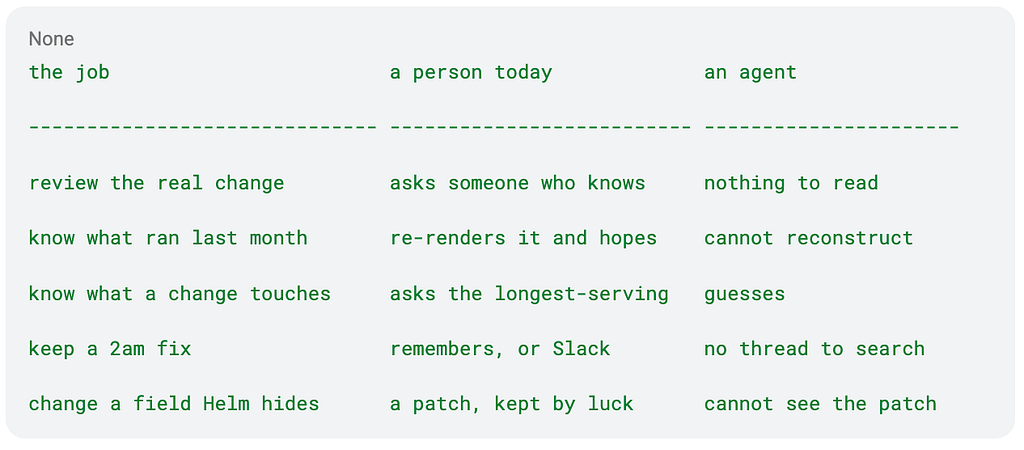
A person fills those gaps with memory, colleagues, and a thread from three weeks ago. An agent lacks all that context. Therefore it proposes changes against configuration it has never seen, at a rate no reviewer can absorb. That is a real problem.
However with the record in place, in the store, every cell in the third column now becomes a query against stored data, and Part 4’s machinery applies: the change is proposed against the real objects, its footprint is computed before it moves, and a field can carry an owner, so two agents changing the same value is arbitrated rather than last write wins.
HOW does the store add value?
And in particular how does the store help with HELM pain points?
Do we need to “fix Helm”? If you have been doing this a while, you have watched a procession of new tools arrive to fix Helm: new template languages, new overlay systems, new DSLs, most of them now unmaintained. Each asked you to rewrite what already worked.
ConfigHub’s approach is a different kind of proposal. The difference is structural: all those tools competed with the chart, and our proposal does not touch the chart. Templates, values files, the chart ecosystem, your golden path, all unchanged. What changes is what happens to the output after the render.
First, what the store is. A database that holds your rendered Kubernetes configuration as structured data, and that inputs and outputs OCI images. Each environment’s configuration lives in it as a set of versioned units. These are the actual objects: every field value is there; not hidden in templates. Alongside them you can retain metadata and comments, for example the chart source, version and values that produced them. Also the history of every change with who made it, relationships between environments: which one is a variant of which, etc.
You read and change config data through a CLI and an API, and it publishes plain YAML out the other side, as OCI images (or files), for the Argo or Flux you already run. The cluster side of your setup does not know it exists. You can insert it into any OCI GitOps flow.
Where is the added value? It is more than the render-first family we set out in the table above. Those approaches save the right thing and save it as text, so the relationships are gone and the next render still wins. The store keeps the same content as data, with the relationships recorded, so a footprint is a query and your changes merge forward.
If you already render before delivery, this is the same idea carried to its logical conclusion.
Note that this is not “another way to write charts”. There are extra steps: render, import, and then the environment structure if you want it. What matters is that they happen once per chart version rather than once per deploy, and they replace more complex steps you are already doing. For example: the post-renderer, the config management plugin, managing the patches that have to survive every upgrade.
Helm’s model is: the chart is the truth, and every install or upgrade rebuilds the output from it. The store inverts that: the config output is the truth, the record, and the chart becomes an input, one source of changes among several. That inversion is exactly why your edit survives an upgrade here and gets lost in Helm.
And it is not another deployment tool. It does not talk to your clusters. Argo, Flux, or kubectl still do the applying; the store is where the configuration they apply is kept, changed, and accounted for.
It also does not require a migration. If you already run Git to CI to OCI to Argo or Flux, the store can sit inside that flow and publish the same objects straight through, with its own digest and a provenance annotation, before you make a single variant. You can check that by comparing what went in with what came out.
So here is what “keep using Helm” looks like
-
Authoring is unchanged: charts, values files, the community ecosystem, all as before, and chart authors do nothing differently.
-
So here is the boundary. Values stay where they are and do what they are for. Anything the chart exposes, and you set routinely belongs in values. Keep doing that if you like!
-
The store is for what values cannot do: a field the chart does not expose, an edit that has to survive the next upgrade, a difference in one environment that you want recorded with a reason, and anything an agent or a 2am fix wrote.
-
Both layers stay visible, what came from the chart and its values, and what was changed after the render, so you can always tell which is which, and a change that collides with a chart value is something the store can flag rather than quietly resolve.
-
Upgrades run through the store’s merge rather than Helm’s rebuild.
-
The render becomes an import step rather than the deploy path.
If your team lives in helm commands all day, this is a real change.
Helm is kept as the way configuration is written.
It stops being the way configuration is run.
Walk it through with Redis
We present an example which also uses some of our tools. Please do as much of this as you like: the first part needs nothing but the tools you already have, the second needs no account, and only the last one asks you to sign in to ConfigHub.
With tools you already have
1. Render it yourself and keep the output.

That file is the configuration your cluster would actually run. Read it. If you deploy Redis to more than one environment, render each of them and diff the outputs against each other; that diff is usually how your environments really differ, and it is where a long-forgotten override shows up.
2. Read the Secrets before anything is applied. The Redis render includes a Secret with generated password material. On your machine you can see it. Through a sync-time render you cannot, which is how a chart-generated credential ends up in a cluster without anyone having looked at it. This is also how you inspect what an agent’s values actually produced, rather than what it said they would.
3. Deploy the files, not the chart. Commit them to a branch or push them to a registry, and point the Argo or Flux you already run at them. Any OCI push tool will do for now, and step 7 below will replace this with one command. Good work! you have now built the Rendered Manifests Pattern by hand, and it is a real improvement: reviews show the actual change, and an auditor has something to look up.
4. Try to break it. Edit one field in the rendered file, ideally a field that the chart does not expose at all, and then apply it. It works. Then upgrade the chart and re-render. Your edit is gone, because the render only knows the chart and the values, and your edit was in neither. Keeping it would mean a three-way merge between the old render, the new render and your copy, by hand, for every file, every environment, every upgrade.
Ok, next!
With our open source tools, and no account
Bear with me, because Helm is complex and I want to skip a lot of details for now.
I want to show you some tooling that does not break or lose config data due to re-rendering. Remember that our strategy is: Helm is kept as the way configuration is written, but it stops being the way configuration is run. Now, I also want to give you a way to see this without signing up for our server. You are also welcome to sign up for the free trial on our SaaS edition.
I have chosen to use Brian’s package installer which is designed to only use explicit config. This means we can see what we are installing at each step, and update, patch and customize installations without re-rendering. It does not have templates or a programming language. We can use this tool to capture the output of Helm in a reusable form. That is we can take a chart and create config files, which the installer can then deliver as a package. The idea is to produce exactly the same outputs as Helm! But in a way that we can manage without re-rendering.
To save you having to learn anything, I have prepared some test packages, all pre-rendered.
5. Take a render someone already did. For demo purposes I shall publish a small public catalog of charts already rendered, reviewed and recorded properly. Pulling one writes the files locally and does not run Helm, because the files are the package.

6. Read what it wrote, then check it against Helm. The objects land in out/manifests, and if the preset separates secret material it goes to out/secrets rather than being mixed in with everything else. Run helm template and compare object for object; across the catalog it currently matches on every measured row.
7. Publish the rendered objects as an artifact, in the same command.
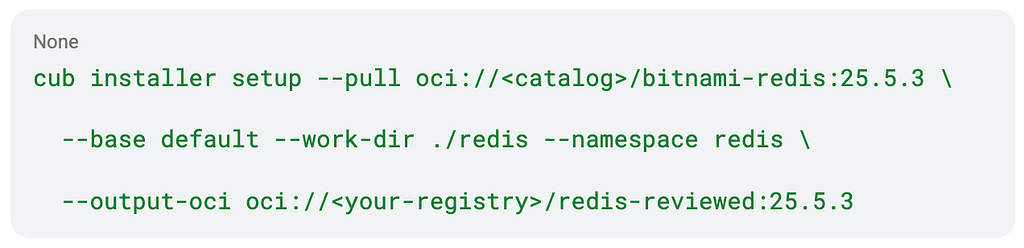
That writes the exact non-secret objects you just read, records which package and which base produced them, then pulls the artifact back and checks its object-set digest before it returns. Point Argo or Flux at it and your controller receives precisely the objects you inspected. This is what we do: check an artifact in, work on it, and check an artifact out.
8. Choose a setting and watch it survive one upgrade. Set an image or a value at pull time, then pull a newer chart version. Your choice is carried forward rather than reset to the chart default. Win!
At this point you can see everything, prove parity with Helm, publish a checked artifact your controller consumes, and keep the settings you chose.
What you still cannot do is keep an arbitrary edit, one to a field no chart value exposes, and nothing yet knows how your environments relate. For this you will need a config data store.
Sign Up for ConfigHub
In simple terms this will let you store config, data, policies, access and relationships. Create new versions, patch, upgrade and do bulk operations. It is OCI in and OCI out: hand it an artifact of rendered objects, work on them, and get a checked artifact back, which is how it fits a flow you already run without a migration. Like a content management system for configurations.
9. Put the files under management.

10. Edit a field the chart never exposed. Not a value, the object itself. Plan it, upload it.
11. Upgrade the chart, and keep your edit. Pull the newer version with the merge flag and the upgrade arrives as a change against your record rather than a rebuild over the top of it.
See also Redis walkthrough in detail.
Summary
We upgraded in place! We did not lose anything. This is great news for platform and app teams who need to tweak configurations.
Starting from the public Redis 25.5.3 package, fourteen objects were imported and a change was recorded after the render, dropping the replica StatefulSet from three to two. The chart was then upgraded to 27.0.0, a major version that also moves Redis itself from 8.6.3 to 8.8.0. Before anything ran, the plan said what would happen: nothing was added, thirteen objects were changed, nothing was deleted, and there was no reset of the replica count. And after the upgrade, the replica count was still two.
The rest of the run is the part a Helm user cannot do at all today.
-
Two environments were shown as being in the path, development first and staging behind it. Both were promoted.
-
A release will be published, a portable OCI built and pulled back with the files matching, and two Argo CD clusters reconcile the same digest with Redis answering on both.
-
Then the exact pre-upgrade revisions are then restored under a change set named for the rollback, a rollback package can be published, and both clusters returned to 25.5.3 with two replicas, healthy. Every step will be a recorded, versioned change.
Every chart is different: so we need a catalog of best practice
I said Helm was complicated. Hooks, CRDs, oh my! How can we make these behave? The short answer is that there is NO programmatic transformation from a general Helm chart to another authoring format. That may be why all the “Helm replacements” did not take off. People actually use all the funky extra features in Helm even when it may not be best practice. And so:
All charts can be managed this way; but the best way is not identical for every chart. Values layer differently, templates conditionally produce different objects, some fields are structures and some are just knobs. One way to deal with this is to have a small number of core “base” use cases, each with their own setup.
The — base default you saw in step 5 is one of those: a supported way to run one chart version, with the chart, version, values and choices that produced it recorded alongside the objects, and the review evidence published.
A base also records what the chart does at the edges. Charts install CRDs, run setup jobs, generate Secrets, and expect things to already exist, and none of that is silently executed here: each behaviour is a recorded choice per base, and nothing is described as automatic until it has actually run and been recorded. In some use cases we might not use the CRDs at all.
Follow that one step further and something bigger appears: best-practice editions of your charts, the same chart, held as data, specialised to a policy set, PCI, air-gapped, dev-loop, shareable, and maintained as the base evolves.
Try it
If you have not done the walkthrough, do it. Steps 1 to 4 take an hour with tools you already have, and step 4 is worth the hour on its own, whatever you decide about the rest. Steps 5 to 8 need no account. The site has the copy-paste version for all of it.
If you want to try it on something of your own, here is the interesting one. Take a chart and a values file that an AI wrote for you, and run it through the same path: render before applying, read what it actually produced, fix what it got wrong, and package the reviewed result as a checked artifact with the fixes recorded. We did try this out, with an NGINX values file. We found six problems in one file: an API key sitting in plain text in the Deployment, an unpinned image, non-root execution turned off, privilege escalation turned on, the Service quietly changed to a LoadBalancer, and a writable root filesystem.
Where this leaves us
Your phone does not lose your contacts when the app updates.
Your clusters should not lose your configuration due to how you use Helm charts.
Helm and CI are kept for what they are good at: authoring and building. Operating moves to the config data record: the ConfigHub store. Charts continue to be authored by package owners. CI keeps building and rendering. But we keep the output: it stops being a throwaway compile on the production path and becomes the record. If you remember one thing: build once, make the output the record, change everything from there.
Next in the series: the ConfigHub Tutorial. After that: the store. Where the record actually lives, what it holds besides config, secrets included, and why an export to Git and OCI means you can always walk away.
– alexis

Postscript: other tools
Kubara, the same shape at platform scope. Everything above was argued at the scale of a chart. Kubara (kubara.io) shows a whole platform: an open-source CLI that generates Helm and Terraform from embedded best-practice templates plus your config, hands the durable files to a GitOps repo, and bootstraps Argo to apply them. Generation up front, durable output, a reconciler applying literal files, and an opinionated edition of dozens of community charts in one move. Adding a database such as ConfigHub brings the fleet-scale questions within reach: who changed what after generation, what does a re-generation overwrite, what is the blast radius of a platform-version bump across many such platforms? The answer is the same as before: keep the WET as data, with its structure, its owners, and its history.
Rendered Manifests and more. Prior art, gladly acknowledged. The Rendered Manifests Pattern and sourceHydrator come from the Argo community, who also supply the best one-liner for the disease, rendering at sync time is like running apt-get install in a container’s startup script, and the repo-server arithmetic for why render-once pays. “Gitless GitOps” is the same instinct. The variant model here was shaped by the creator of Kustomize, to fix the pains that overlays exposed. The pattern is converging from several directions. What this series adds is what the stored result is: not files, a record, as data, with its structure recovered.