Modern applications are made up of many components, and each component may need configuration. Deploying and managing each individual component can be difficult. Ensuring versions match, ensuring smooth rollouts, and reconciling live state can all be challenging when dealing with individual components and its configuration. So what if we can bundle all these components’ configuration to ensure it’s all one version, applied atomically and able to make use of existing tools to manage rollout and reconciliation?
By serving configuration as OCI Bundles, we are able to ensure each piece of configuration for the application is bundled at a specific revision, and given a specific version. This ensures that all configuration is downloaded at once. You may be most familiar with OCI Bundles from things like Docker or Podman, in which OCI Bundles are used for container images, but at its core, OCI Bundles are versioned bundles of files. The OCI Bundle itself consists of two main artifacts, the manifest, and the layer(s). The manifest provides versioning information and annotations for the bundle and how OCI clients discover what data to pull. When you use an OCI tag, it is resolved to a manifest to be pulled. The manifest itself is a JSON blob that can be parsed and referred to by OCI clients. The layer is a compressed tarball containing all the data of the OCI bundle, to be unpacked by the OCI client. This makes for an efficient and reliable way to deploy configuration by bundling all configuration data and providing a digest to refer to that point-in-time snapshot of the data.
With a tool like ArgoCD, or FluxCD, OCI bundles can be downloaded and rolled out into your existing cluster. ArgoCD will synchronize the OCI bundle on a tag, unpack its contents, reconcile it with your cluster’s live state and begin rollout. It then gives you a live status view of the application in the cluster once the bundle has been applied.
Confighub ties these things together, implementing OCI Bundles for serving configuration to OCI client Targets, and hooking into ArgoCD or FluxCD to manage rollout. The resulting OCI Bundle is a flat file structure, of each Unit of configuration in the given Space. Confighub models these bundles with the Release API entity, as each bundle is a cut release of configuration data, ready to be deployed via ArgoCD or FluxCD.
Example
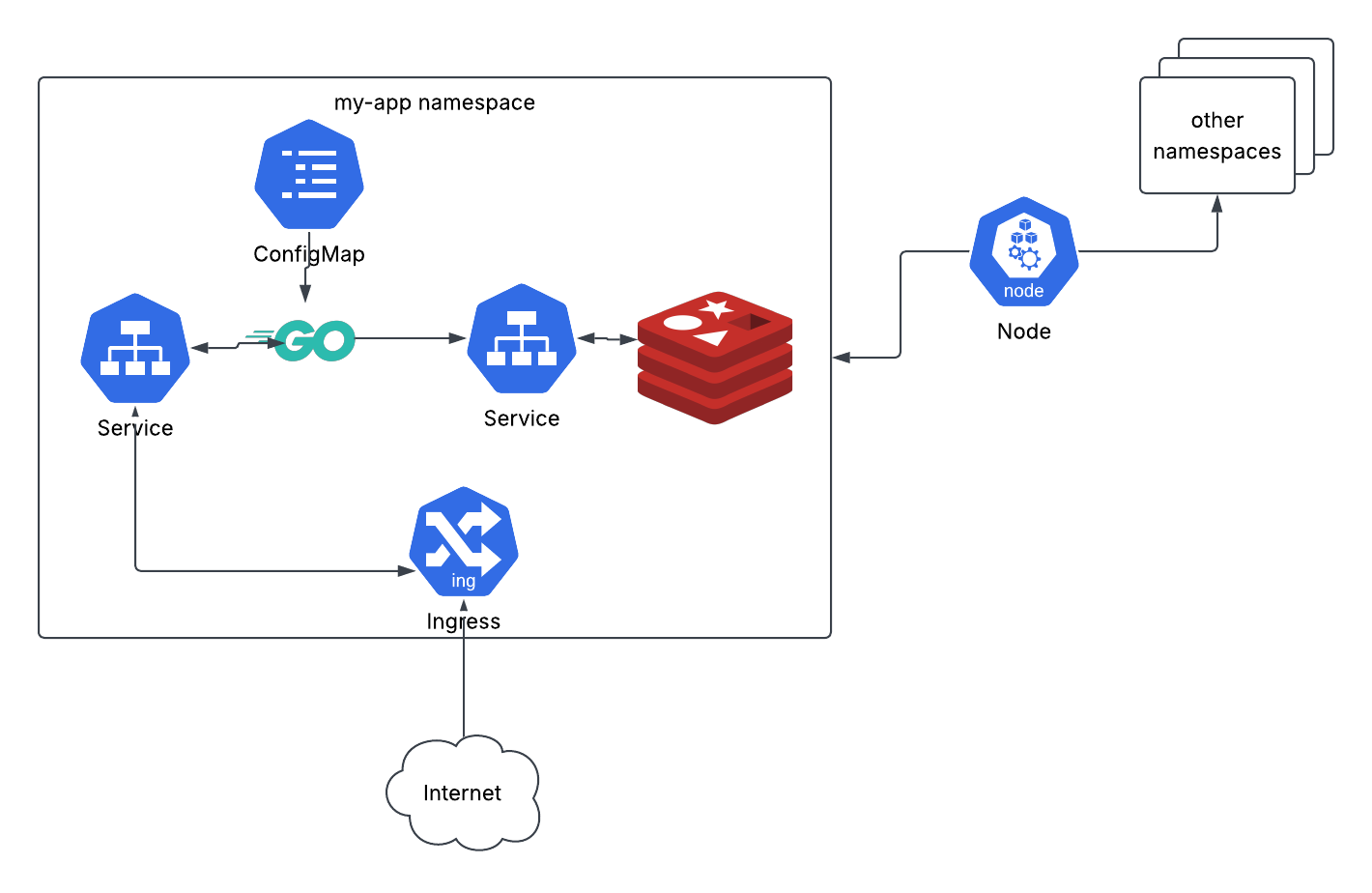
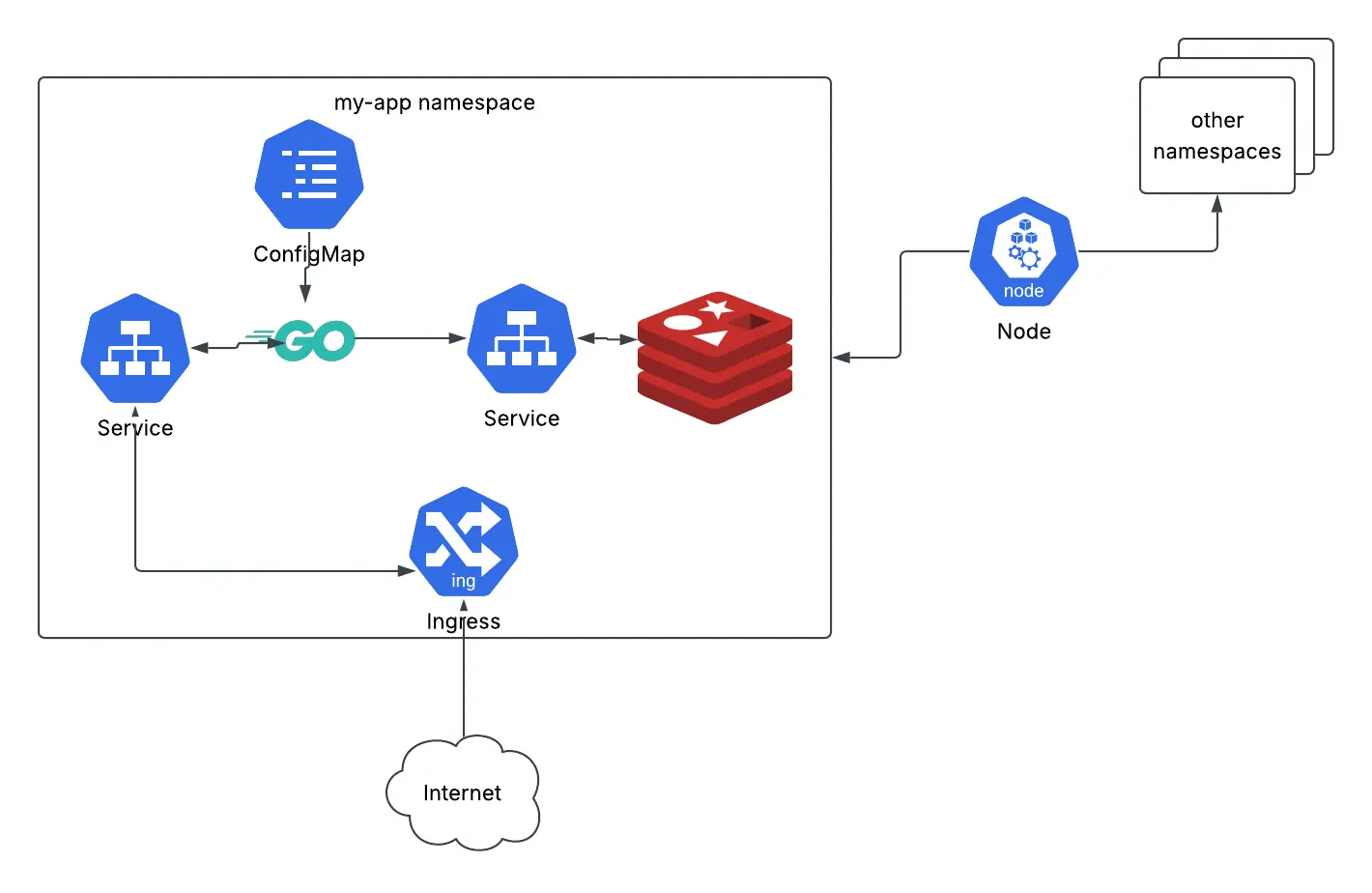
Here’s an example application, a Go binary app, using Redis as a datastore. To deploy this to Kubernetes, you need a Namespace, a Deployment for the Go binary, a Deployment for Redis, an Ingress, a Service for Redis, a Service for the Go binary, and a Configmap. Normally these are all applied to a Kubernetes cluster via <command> or individually with kubectl apply -f. By bundling these configurations as an OCI Bundle we can ensure what is deployed is an immutable snapshot of this data at specific revisions. Any subsequent changes can then be made as a new bundle, and if need be, we can revert to the original bundle at any time.
Deploying the Example
Using Confighub, we’re able to upload the entire application’s configuration and deploy it as an OCI Bundle. Let's assume we’re working with an AI agent such as Claude Code and asking it to create the Kubernetes configuration for the above Go binary and Redis. It may then output these configurations as such:
tree ./my-app/k8s/
|_my-app-deployment.yaml
|_my-app-service.yaml
|_my-app-configmap.yaml
|_redis-deployment.yaml
|_redis-service.yaml
|_ingress.yaml
|_namespace.yaml
Traditionally, we might check these into a git repository, and any changes are made as commits, however this comes with its own set of challenges, amongst which is applying each individual file. You can read more about the challenges of that approach here. Instead, you can upload this configuration into Confighub as such:
cub variant upload --component my-app --variant base --granularity per-file ./my-app/k8s/
Now if we view our available Spaces:
cub space list
NAME             COMPONENT    OWNER    VARIANT    ENVIRONMENT    REGION    LAYER    #UNITS
my-app-base      my-app                base                                         6
And our available Units:
cub unit list --space my-app-base
NAME                 SPACE          CHANGESET    TARGET    UPGRADE-NEEDED    UNRELEASED-CHANGES    APPLY-GATES    LAST-CHANGE-DESCRIPTION
ingress              my-app-base                                                                   None           Initial Data: 1010 bytes; from /tmp/cub-upload-2502866588.yaml
my-app-configmap     my-app-base                                                                   None           Initial Data: 221 bytes; from /tmp/cub-upload-350878731.yaml
my-app-deployment    my-app-base                                                                   None           Initial Data: 815 bytes; from /tmp/cub-upload-397596155.yaml
my-app-service       my-app-base                                                                   None           Initial Data: 233 bytes; from /tmp/cub-upload-934789959.yaml
namespace            my-app-base                                                                   None           Initial Data: 91 bytes; from /tmp/cub-upload-1128906247.yaml
redis-deployment     my-app-base                                                                   None           Initial Data: 2370 bytes; from /tmp/cub-upload-598007432.yaml
redis-service        my-app-base                                                                   None           Initial Data: 283 bytes; from /tmp/cub-upload-163522816.yaml
Here we’ve created a base variant that we can create env-specific variants from. Now we can create a variant for a development environment. The following will do just that:
cub cluster up --name dev # spins up a kind cluster with ArgoCD and creates a Target for it
cub variant create development my-app-base --target dev/target --namespace my-app-dev # automatically registers the application with Argo and creates a separate Space with cloned units
Now we’re ready to publish an initial release:
cub release publish my-app-dev
This takes all Units in the Space for the application, bundles them at the HEAD Revision, or we could specify Revisions using a Tag with --revision <tag>, and makes the bundle available at oci://<host>:<port>/space/<space>:latest.
This bundle will be automatically picked up by the root app-of-apps cub cluster up created. ArgoCD will then automatically sync on the “latest” OCI tag, meaning an published update will be automatically sync.
Now what if one of those updates were erroneous and we need to rollback until a fix can be made? We can pin the Argo app to the previous Release’s manifest digest. To do so, we need to fetch the desired Release, and copy its manifest digest with the following:
cub release list --space my-app-dev
RELEASE-ID                              PUBLISHED    MANIFEST-DIGEST                                                            CREATED
a7dfa75e-ae92-4e32-9b9c-5f3ba91bf361    true         sha256:54279ca063dc6d704ba846bb50bb363b7713542511e68b54e2294887eedf916b    2026-07-30 14:40:46.006834 +0000 UTC
ba4eead0-22ec-457f-9919-581f629ef130    true         sha256:29b17db161d959278d9eec0118f95d6164b99c2b3291ccc35416ed3300d85e9a    2026-07-30 14:41:59.439061 +0000 UTC
The latest tag is always the most recently published Release, so we can take the digest from the one previous, and set it in ArgoCD. Once we make the appropriate fixes, we can switch the tag back to “latest”.
Alternative
Lets say I was already running JFrog in my infrastructure and storing my artifacts in there. Instead of uploading the variant from source files like the above example, I can store an artifact of the source configuration as an OCI Bundle in JFrog, and upload the base variant from there like so:
cub variant upload oci://<jfrog host>:<jfrog OCI port>/my-app-local/my-app
This command replaces the original cub variant upload which was using the local filesystem, and instead downloads an OCI Bundle as a source for the base variant. From there, the same steps to create a development variant, edit if need be, and publish a Release remain the same.
Summary
Release and the OCI Bundles it models gives us a powerful and versatile means of deploying configuration as snapshots-in-time. This allows us to rollout, or rollback, configuration with ease, as well as automate its deployment. Applications can make use of this API whether they have a single component, or many, and you can use the Variant API to manage them across multiple environments.
You can read more about how to deploy with Confighub and our Release API in our tutorial.