
Can internal developer platforms and imperative operational tools coexist? I believe they can, if one builds on the right model.
I have recently been writing about building tools to perform Kubernetes management tasks (1, 2, 3). Performing tasks with imperative tools can be more goal-oriented, direct, concise, and ergonomic than editing large, complex configuration-as-code files that must accommodate all conceivable tasks, and can help perform common tasks quickly, correctly, and safely. Imperative tools can also be learned quickly by both humans and AI agents, without reading pages of reference documentation, especially if they have intuitive command names and decent help text. They can also be relatively efficient in terms of token usage, and well scoped, hierarchical commands naturally provide progressive disclosure. Autocompletion is supported in cases where humans are still typing the commands.
I also believe that such tools capture expertise more effectively and in a more reusable form than configuration-as-code templates and modules. For some of the tools, a fair bit of the creation time was spent on “product” research and product definition, and I’m already very familiar with Kubernetes and its ecosystem.
What makes such tools possible is storing configuration as data in a database with an API, as opposed to configuration as code. This enables us to build imperative tools, like, say, kubectl. Tools that can imperatively change the configuration data. A lot of functionality in kubectl, such as kubectl edit, is relatively generic. But tools can be as general or as specific, such as the tools for managing Kubernetes RBAC and NetworkPolicy, as we like.
As with Kubernetes itself, the configuration data stored in ConfigHub is (primarily, for now, other than application configuration) Kubernetes resources, or rather KRM resources, which are declarative. Using controllers like Crossplane, ACK, and Config Connector, KRM resources can also provision cloud resources.
This serialized representation of the desired state can be changed and validated prior to being applied. A GitOps tool, such as ArgoCD or Flux, can perform the apply by pulling the configuration from ConfigHub’s OCI endpoint.
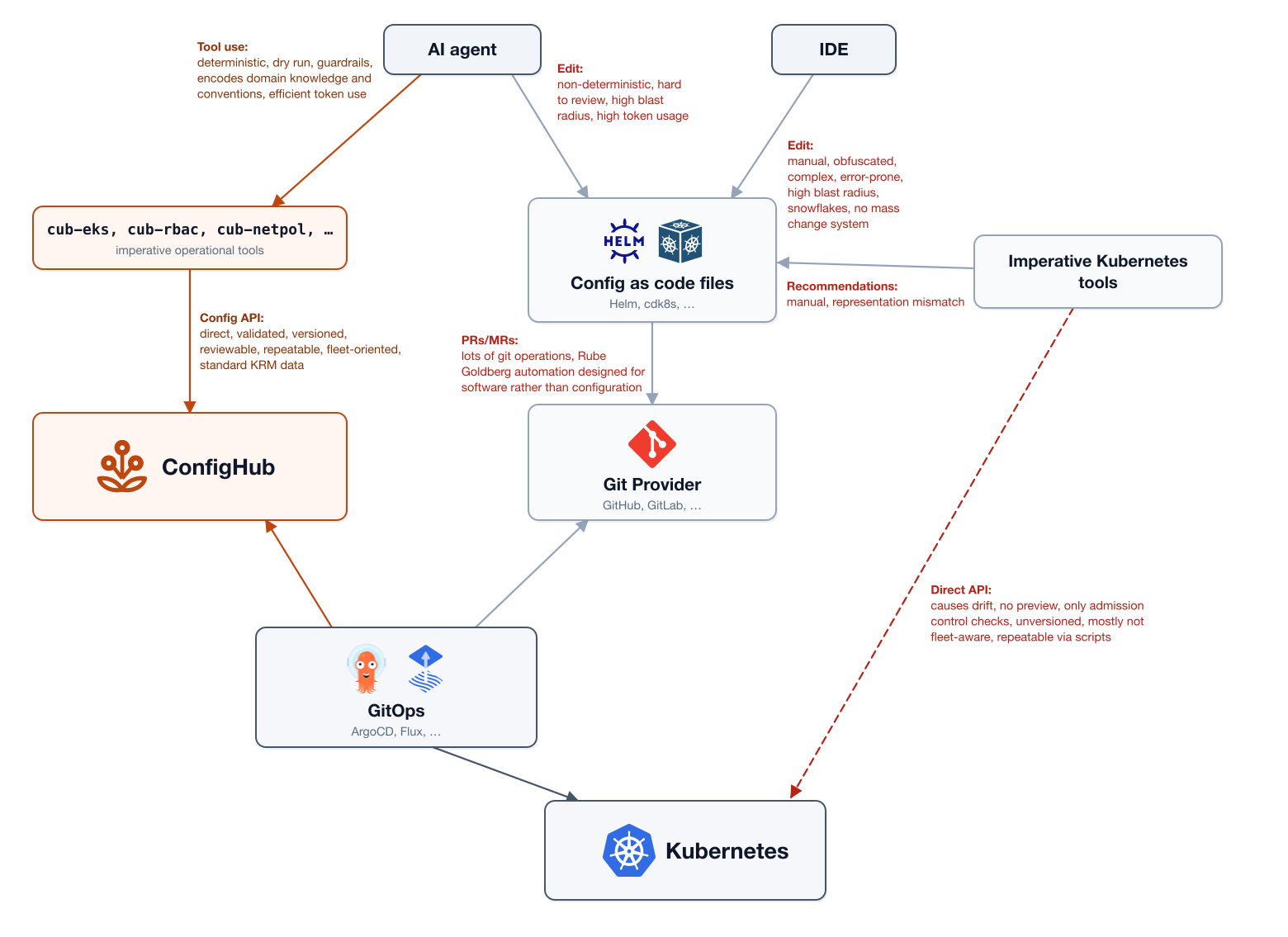
Unlike resources stored by the Kubernetes control plane, the configuration data in ConfigHub is automatically versioned. ConfigHub also supports approaches to keep multiple variants of a configuration in sync. These are the two main capabilities that would otherwise normally drive users to configuration as code tools. Instead, we have a declarative system of record that we can operate upon with tools in a repeatable, scalable manner.
As another tool-building demonstration, I created a tool to manage EKS clusters inspired by eksctl. eksctl provides a simpler experience for creating EKS clusters compared to, say, Terraform or OpenTofu, with developer-friendly imperative commands. To use it, one doesn’t need to know all of the details of the EKS APIs. For example, you can create a cluster with eksctl create cluster.
Under the hood, eksctl generates CloudFormation. Instead of generating CloudFormation configuration, cub-eks creates, updates, reads, and validates Crossplane managed resources in ConfigHub. The code is here:
https://github.com/confighub/examples/tree/main/eks-manager
Why managed resources rather than composite resources? Like configuration as code, Crossplane compositions abstract the underlying managed resources, and are implemented using unidirectional configuration generators. Crossplane compositions expect that all changes (with a few special exceptions) to the generated resources will be made by changing the composition input values or the composition functions. This is called exclusive actuation (similar to template catalogs), and obstructs composable, interoperable tools that read-modify-write the resources, which is what we’re trying to enable. Any out-of-band changes are considered configuration drift. Furthermore, I typically see additional generators, such as Helm and/or Backstage scaffolder templates, layered on top of composite resources, which makes the managed resources even harder to change when operationally necessary.
That doesn’t mean the tools can’t provide opinionated experiences over the underlying resources. For example, I decided to only support EKS auto mode. But it is a golden path, or part of one, as opposed to an inflexible constraint.
Hard and soft guardrails are still possible to enforce, via Triggers. This command:
% cub-eks guardrails install
creates a number of default guardrails to catch changes that would violate policies. A guardrail was also added regarding auto mode, at least for now, but it’s just a warning. You can see what it created by listing the Triggers and what they check (expressed using CEL):
% cub trigger list --space eks-policy -o yq='[.[] | {(.Trigger.Slug): .Trigger.Arguments[0].Value}]'
- eks-automode-invariant: '!(r.kind == ''Cluster'' && has(r.spec.forProvider.computeConfig)) || (has(r.spec.forProvider.storageConfig) && has(r.spec.forProvider.kubernetesNetworkConfig))'
- eks-control-plane-logging: '!(r.kind == ''Cluster'') || (has(r.spec.forProvider.enabledClusterLogTypes) && ''audit'' in r.spec.forProvider.enabledClusterLogTypes)'
- eks-no-latinit: '!(r.kind == ''NodeGroup'' && has(r.spec.managementPolicies)) || !(''LateInitialize'' in r.spec.managementPolicies)'
- eks-pinned-version-extended-support: '!(r.kind == ''Cluster'' && has(r.spec.forProvider.version)) || (has(r.spec.forProvider.upgradePolicy) && r.spec.forProvider.upgradePolicy.supportType == ''EXTENDED'')'
- eks-private-endpoint: '!(r.kind == ''Cluster'' && has(r.spec.forProvider.vpcConfig) && has(r.spec.forProvider.vpcConfig.endpointPublicAccess) && r.spec.forProvider.vpcConfig.endpointPublicAccess) || (has(r.spec.forProvider.vpcConfig.publicAccessCidrs) && !(''0.0.0.0/0'' in r.spec.forProvider.vpcConfig.publicAccessCidrs))'
- eks-secrets-encryption: '!(r.kind == ''Cluster'') || has(r.spec.forProvider.encryptionConfig)'
We can also check where they are registered and whether they have surfaced any gates or warnings:
% cub-eks guardrails status -o table
SPACE             UNIT     GATES  WARNINGS
eks-prod-usw2     cluster  0      3
eks-staging-use1  cluster  0      1
(The output is JSON by default for AI agents.)
We can discover those and some additional issues are with cub-eks findings:
% cub-eks findings -o table
SEVERITY  ANALYZER             CLUSTER       KIND       NAME          MESSAGE
HIGH      exposure             prod-usw2     Cluster    prod-usw2     the Kubernetes API endpoint is publicly accessible with publicAccessCidrs 0.0.0.0/0
MEDIUM    autoscaler-conflict  demo-use1     NodeGroup  system        scalingConfig.desiredSize (3) is set under forProvider with Update management: Crossplane will reconcile it on every pass, fighting Cluster Autoscaler or Karpenter
MEDIUM    autoscaler-conflict  demo-use1     NodeGroup  system-v2     scalingConfig.desiredSize (3) is set under forProvider with Update management: Crossplane will reconcile it on every pass, fighting Cluster Autoscaler or Karpenter
MEDIUM    autoscaler-conflict  prod-usw2     NodeGroup  main          scalingConfig.desiredSize (4) is set under forProvider with Update management: Crossplane will reconcile it on every pass, fighting Cluster Autoscaler or Karpenter
MEDIUM    exposure             prod-usw2     Cluster    prod-usw2     no encryptionConfig: Kubernetes Secrets are not encrypted with a KMS key
MEDIUM    exposure             staging-use1  Cluster    staging-use1  no encryptionConfig: Kubernetes Secrets are not encrypted with a KMS key
LOW       version-skew         demo-use1     NodeGroup  batch         node group is on 1.34, 1 minor version(s) behind the control plane (1.35)
LOW       version-skew         demo-use1     NodeGroup  system        node group is on 1.34, 1 minor version(s) behind the control plane (1.35)
LOW       version-skew         demo-use1     NodeGroup  system-v2     node group is on 1.34, 1 minor version(s) behind the control plane (1.35)
LOW       exposure             prod-usw2     Cluster    prod-usw2     control-plane logging is missing: audit, authenticator
(The demo-use1 cluster was created to test the guardrails.)
cub-eks plan can flag changes that would cause disruptions, such as node re-creation, or cause Crossplane’s provider implementation to not be able to update the cluster or nodepool due to immutable AWS API fields.
% cub-eks plan -o table
DISRUPTION           CLUSTER    UNIT       REV   RESOURCE   CHANGED
replace              demo-use1  ng-system  1->3  system     instanceTypes.0, scalingConfig.maxSize
rolling              demo-use1  ng-batch   2->3  batch      version
in-place-disruptive  demo-use1  cluster    1->2  demo-use1  version

  eks-demo-use1/ng-system — REPLACE
    instanceTypes.0: instanceTypes is immutable
    This cannot be reconciled in place. Crossplane will refuse the update and
    retry forever; the Unit will read as applied while AWS is never changed.
    -> this replaces the node group — use `replace-nodegroup` for a blue/green swap, or revert the field

3 Unit(s) with pending changes: 1 blocking, 1 rolling, 1 in-place.
43 Unit(s) have never been applied (no baseline to compare against).
In order to do these kinds of checks prior to deployment when using Crossplane compositions, one would need to render the compositions client-side, such as in CI.
We can also just inspect the state with domain-specific commands — snapshot, versions, list, and get:
% cub-eks snapshot -o table
CLUSTER       VERSION  REGION     MODE     NODEGROUPS  ADDONS  NETWORK  IAM  UNITS  GATED  UNAPPLIED
demo-use1     1.35     us-east-1  auto     3           1       2        1    8      0      8
prod-usw2     1.33     us-west-2  classic  1           0       0        0    2      0      2
staging-use1  1.34     us-east-1  auto     1           1       24       9    36     0      36

3 clusters, 5 nodegroups, 2 addons, 46 units (0 gated, 46 unapplied)


% cub-eks versions -o table
CLUSTER       ENV      VERSION  SUPPORT   MODE     NODEGROUPS  MAX SKEW  ADDONS
demo-use1     dev      1.35     EXTENDED  auto     3           1 behind  1
prod-usw2     prod     1.33     EXTENDED  classic  1           -         0
staging-use1  staging  1.34     EXTENDED  auto     1           -         1

versions: 1.35 x1, 1.34 x1, 1.33 x1
3 clusters, 3 distinct versions, 1 with node-group skew, 0 pinned under STANDARD support


% cub-eks list -o table
CLUSTER       GROUP  KIND                   NAME                                                       UNIT
...
staging-use1  ec2    EIP                    staging-use1-nat-a-eip                                     eip-nat-a
staging-use1  ec2    InternetGateway        staging-use1-igw                                           igw
staging-use1  ec2    NATGateway             staging-use1-nat-a                                         nat-a
staging-use1  ec2    Route                  staging-use1-private-a-default                             route-private-a-nat
staging-use1  ec2    Route                  staging-use1-private-b-default                             route-private-b-nat
staging-use1  ec2    Route                  staging-use1-private-c-default                             route-private-c-nat
staging-use1  ec2    Route                  staging-use1-public-default                                route-public-igw
staging-use1  ec2    RouteTable             staging-use1-private-a-rt                                  rt-private-a
staging-use1  ec2    RouteTable             staging-use1-private-b-rt                                  rt-private-b
staging-use1  ec2    RouteTable             staging-use1-private-c-rt                                  rt-private-c
staging-use1  ec2    RouteTable             staging-use1-public-rt                                     rt-public
staging-use1  ec2    RouteTableAssociation  staging-use1-private-a-assoc                               rta-private-a
staging-use1  ec2    RouteTableAssociation  staging-use1-private-b-assoc                               rta-private-b
staging-use1  ec2    RouteTableAssociation  staging-use1-private-c-assoc                               rta-private-c
staging-use1  ec2    RouteTableAssociation  staging-use1-public-a-assoc                                rta-public-a
staging-use1  ec2    RouteTableAssociation  staging-use1-public-b-assoc                                rta-public-b
staging-use1  ec2    RouteTableAssociation  staging-use1-public-c-assoc                                rta-public-c
staging-use1  ec2    Subnet                 staging-use1-private-a                                     subnet-private-a
staging-use1  ec2    Subnet                 staging-use1-private-b                                     subnet-private-b
staging-use1  ec2    Subnet                 staging-use1-private-c                                     subnet-private-c
staging-use1  ec2    Subnet                 staging-use1-public-a                                      subnet-public-a
staging-use1  ec2    Subnet                 staging-use1-public-b                                      subnet-public-b
staging-use1  ec2    Subnet                 staging-use1-public-c                                      subnet-public-c
staging-use1  ec2    VPC                    staging-use1-vpc                                           vpc
staging-use1  eks    Addon                  aws-efs-csi-driver                                         addon-aws-efs-csi-driver
staging-use1  eks    Cluster                staging-use1                                               cluster
staging-use1  eks    NodeGroup              batch                                                      nodegroup-batch
staging-use1  iam    Role                   staging-use1-cluster-role                                  cluster-role
staging-use1  iam    Role                   staging-use1-node-role                                     node-role
staging-use1  iam    RolePolicyAttachment   staging-use1-cluster-role-AmazonEKSBlockStoragePolicyV2    cluster-role-amazoneksblockstoragepolicyv2
staging-use1  iam    RolePolicyAttachment   staging-use1-cluster-role-AmazonEKSClusterPolicy           cluster-role-amazoneksclusterpolicy
staging-use1  iam    RolePolicyAttachment   staging-use1-cluster-role-AmazonEKSComputePolicy           cluster-role-amazonekscomputepolicy
staging-use1  iam    RolePolicyAttachment   staging-use1-cluster-role-AmazonEKSLoadBalancingPolicy     cluster-role-amazoneksloadbalancingpolicy
staging-use1  iam    RolePolicyAttachment   staging-use1-cluster-role-AmazonEKSNetworkingPolicy        cluster-role-amazoneksnetworkingpolicy
staging-use1  iam    RolePolicyAttachment   staging-use1-node-role-AmazonEC2ContainerRegistryPullOnly  node-role-amazonec2containerregistrypullonly
staging-use1  iam    RolePolicyAttachment   staging-use1-node-role-AmazonEKSWorkerNodeMinimalPolicy    node-role-amazoneksworkernodeminimalpolicy

46 resources


% cub-eks get demo-use1 -o table
CLUSTER demo-use1

  control plane    demo-use1
  apiVersion       eks.aws.upbound.io/v1beta2
  version          1.35
  region           us-east-1
  compute          auto mode (general-purpose,system)
  endpoint         private=yes public=no
  logging          api,audit,authenticator
  encryption       yes
  auth mode        API
  support type     EXTENDED
  deletion policy  Orphan
  mgmt policies    Observe,Create,Update,Delete
  unit             eks-demo-use1/cluster

NODE GROUPS
  NAME       VERSION  INSTANCE TYPES         CAPACITY   MIN  MAX  DESIRED   UNIT
  batch      1.34     m6i.xlarge,m6a.xlarge  SPOT       0    20   2 (init)  ng-batch
  system     1.34     m6i.xlarge             ON_DEMAND  3    12   3         ng-system
  system-v2  1.34     m6i.2xlarge            ON_DEMAND  3    12   3         nodegroup-system-v2

ADDONS
  NAME     VERSION             ON UPDATE  PRESERVE  UNIT
  vpc-cni  v1.19.5-eksbuild.1  OVERWRITE  yes       addon-vpc-cni

NETWORKING
  Subnet  1  demo-use1-private-a
  VPC     1  demo-use1-vpc

IAM
  Role  1  demo-use1-cluster-role
Remember, this is a fleet-wide view. Using the default JSON output, AI agents can also build summary tables (e.g., using python) based on what aspects you’d like to see.
But it’s the commands that update the configuration that reach beyond what we could do with configuration as code.
These clusters and nodepools were created with cub-eks create, using the typical CLI approach of specifying values using command-line flags rather than a configuration file. Unlike configuration as code, we don’t need to regenerate the resources in order to make changes, so we don’t need to save an input configuration file as a source of truth. We can just change the resources. For safety, the mutating commands, such as scale and upgrade, use dry run by default. When “committing” changes (without dry run), I required change descriptions and asked the agent to convey what it was asked to do, but you could do differently if you preferred.
% cub-eks scale nodegroup eks-demo-use1/ng-system --nodes-max 15 -o table
PATH                   VALUE  DISRUPTION
scalingConfig.maxSize  15     in-place

Dry run — 1 resource(s) would change in eks-demo-use1/ng-system. Re-run with --commit --change-desc "…" to write.


% cub-eks upgrade nodegroup eks-demo-use1/ng-system --to 1.35 -o table
PATH     VALUE  DISRUPTION
version  1.35   rolling

  warning: EKS will drain and replace every node in this group; check updateConfig.maxUnavailable and PodDisruptionBudgets first

Dry run — 1 resource(s) would change in eks-demo-use1/ng-system. Re-run with --commit --change-desc "…" to write.


% cub-eks upgrade cluster demo-use1 --to 1.36 -o table
Upgrade demo-use1: 1.35 -> 1.36

  #  STAGE              RESOURCE   FROM                TO                      DISRUPTION           STATUS
  1  nodegroup-catchup  batch      1.34                1.35                    rolling              REQUIRED FIRST
  2  nodegroup-catchup  system     1.34                1.35                    rolling              REQUIRED FIRST
  3  nodegroup-catchup  system-v2  1.34                1.35                    rolling              REQUIRED FIRST
  4  control-plane      demo-use1  1.35                1.36                    in-place-disruptive  pending
  5  addon              vpc-cni    v1.19.5-eksbuild.1  (compatible with 1.36)  in-place-disruptive  pending
  6  nodegroup          batch      1.34                1.36                    rolling              pending
  7  nodegroup          system     1.34                1.36                    rolling              pending
  8  nodegroup          system-v2  1.34                1.36                    rolling              pending

  1. batch: behind the current control plane; catch up before the control plane moves
  2. system: behind the current control plane; catch up before the control plane moves
  3. system-v2: behind the current control plane; catch up before the control plane moves
  4. demo-use1: multi-minute; EKS allows only one cluster update at a time
  5. vpc-cni: check the addon version compatible with 1.36 before setting it
  6. batch: drains and replaces every node in the group
  7. system: drains and replaces every node in the group
  8. system-v2: drains and replaces every node in the group

BLOCKED — node groups are behind the current control plane and must be caught up
first. Moving the control plane now would strand them further behind than EKS
supports, and node groups only advance one minor version at a time.

Run these, apply each, and wait for the nodes to roll:
  bin/cub-eks upgrade nodegroup eks-demo-use1/ng-batch --to 1.35 --commit --change-desc "…"
  bin/cub-eks upgrade nodegroup eks-demo-use1/ng-system --to 1.35 --commit --change-desc "…"
  bin/cub-eks upgrade nodegroup eks-demo-use1/nodegroup-system-v2 --to 1.35 --commit --change-desc "…"

Then re-run this command.
Note that the last upgrade command was blocked by the prerequisite checks. The system-v2 nodegroup was created by cub-eks replace-nodegroup, which is used to create a new nodegroup that changes some immutable field of an existing nodegroup. eksctl doesn’t have a command to do this, but has instructions.
We could also implement more sophisticated orchestration and workflows in such tools, though we might also want to implement it as a server, such as a MCP server, if we did that. Such a server could be run with the ability to access the cluster, so that it could orchestrate the draining of the nodes, for example. Note that the workload-manager tool is responsible for ensuring that the workloads have PodDisruptionBudget and proper anti-affinity constraints.
There’s also a fleet-edit command for making mass changes across multiple clusters — again, starting with dry run by default. It automatically chooses an appropriate function to run to change the specified fields based on their data types. These changes are validated by Triggers and can be reviewed before being released to GitOps tools like ArgoCD and Flux.
In the case that clusters and nodepools should have similar properties, they can be created as variants of the same base configuration. One would then first update the base and upgrade the downstream variants. The cub-eks promote command will do that, but so will the standard cub variant promote. This enables similar inheritance as compositions, templates, or modules, but with full transparency and granular control over blast radius.
I only spent about a day on this tool. I’m sure a lot more could be done, such as creating the MCP server version of the tool, or adding support for Karpenter, or (v2) namespace-scoped Crossplane resources, or ACK, or being able to reuse an existing VPC. I also didn’t yet create agent skills the way I did for the other tools. Would you simplify the cluster and/or nodegroup creation options, and make it more opinionated? What would be most useful?
What I find compelling about this is that we can use AI to build deterministic, testable, ergonomic, domain-specific tools that can inspect, modify, and validate the desired state based on standard, stable APIs. As opposed to AI agents directly editing layers of bespoke snowflake templates that are then rendered at apply time and generally would not have this level of domain-specific validation and impact analysis. The ability to orchestrate changes, similar to Kubernetes controllers, but with pre-deployment validation, versioning, etc. is also enticing, and I plan to explore that more in the future.
What kinds of operational changes do you “break glass” to make directly to the live state because of the complexity of making the changes through configuration as code or infrastructure as code? What kinds of operational tools would you build if it were feasible to do without creating configuration drift? Do you often need to make similar changes to different compositions, templates, or modules? Can you query your input values across your fleet? How about the rendered output? Do you generally make changes to input values by hand or using tools? How do you decouple operational concerns from developer concerns? What do you do when one-size-fits-all abstractions block valid use cases? Are there other CloudFormation-based tools that you wish could target Crossplane or ACK resources?
Reply here, or send me a message on LinkedIn, X/Twitter, or Bluesky, where I plan to crosspost this.
You could also try out ConfigHub, which is now in preview.
If you found this interesting, you may be interested in my other posts.
Thanks to Ilya Dmitrichenko, creator of eksctl, for providing valuable feedback on this post.