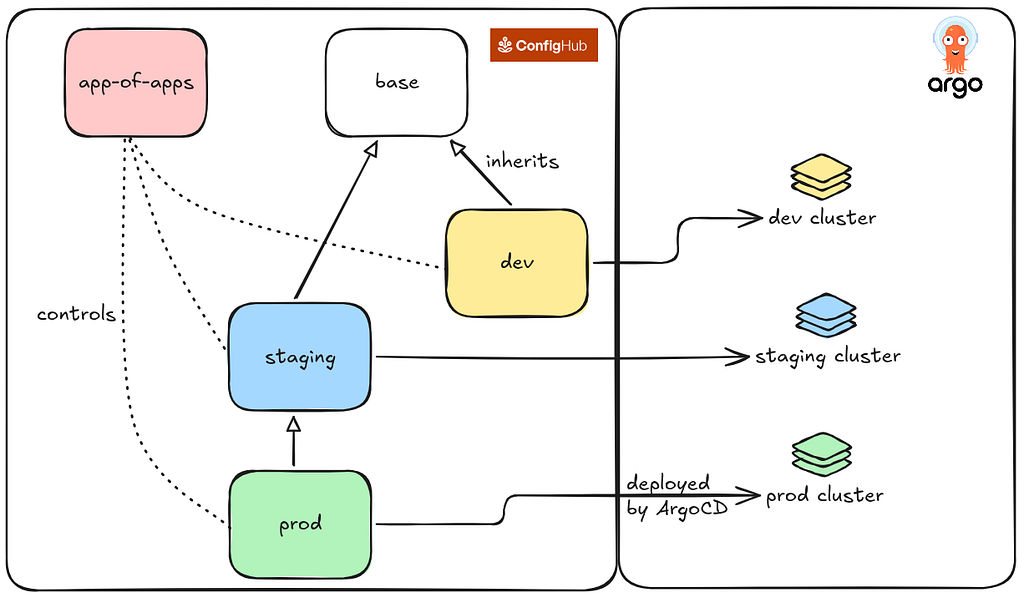
App-of-Apps is how a lot of teams run many Argo CD applications from one place — but what it does, and how it looks, changes once the configuration is stored as data. Everything below comes from a working setup: a kind cluster running Argo CD, a root Application that pulls an app-of-apps unit from ConfigHub over OCI, three child Applications under it, and a guestbook workload deployed to a per-environment vcluster from its own Space.
If you run Argo CD past a handful of applications, you’ve probably built an app-of-apps. You create a root Application whose source is a directory of more Application manifests, and those point at the real workloads. It’s a reasonable way to bootstrap a cluster, or a set of clusters, from one place. When the directory got large, you may have switched to ApplicationSets and let a generator produce the child Application objects instead of maintaining them by hand.
I’m not writing this to argue against the pattern. It solves a real problem. But it’s worth looking at why you end up reaching for it, because the reasons line up almost exactly with the capabilities we’ve been building into ConfigHub: querying configuration across a fleet, propagating values between related pieces, and checking and gating changes before they’re applied.
What you’re actually asking app-of-apps to do
Once you have more than a few applications, you stop caring about them one at a time and start needing to operate on the group. Concretely, that means:
-
Seeing all the apps in a set together, not app by app.
-
Sharing values across them — the destination cluster and namespace, the registry, a region, a common set of labels or policy resources — without restating those values in every child.
-
Expressing ordering and dependencies between them, and deciding what happens to the children when the root changes or is deleted.
-
Having one place to bootstrap and review the whole thing.
App-of-apps gives you a way to do each of these on top of Git. Grouping becomes a directory. Shared values get duplicated across the children, or threaded through an ApplicationSet generator. Ordering becomes sync-wave annotations. The single place to review is the root Application.
People reach for app-of-apps when the apps are heterogeneous and sometimes there are thousands of them. With the Git version, changing one of those apps means the usual commit, push, and review, even when you only wanted to find it and edit a value. In a real setup the manifests for each environment often live in separate repos, so there’s no single place to see or manage them.
In ConfigHub the apps are stored as data you can query across Spaces, which makes them easier to find and change.
The same app-of-apps, backed by data
To make this concrete, here’s the setup I ran. Four Spaces in ConfigHub:
-
guestbook-aoaholds two Units:root(the root Application CR) andapp-of-apps(the three child Applications). -
guestbook-dev,guestbook-staging, andguestbook-prodeach hold oneguestbookUnit — the actual workload, a Deployment and a Service. All of them are Variants of theguestbook-baseSpace.
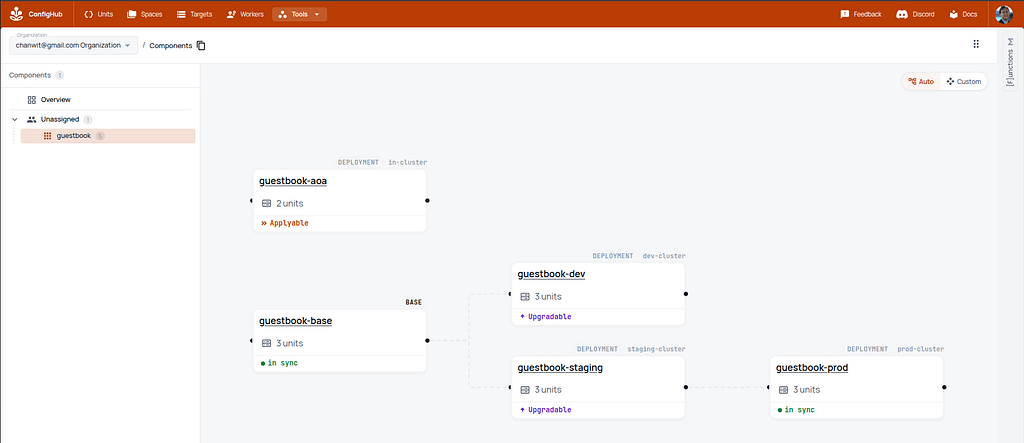
The shape of the pattern is unchanged. What’s different is where the manifests live: instead of a Git directory, each piece is a Unit that Argo pulls over OCI. The root Application points at the OCI address of the app-of-apps unit:
apiVersion: argoproj.io/v1alpha1
kind: Application
metadata:
  name: root
  namespace: argocd
spec:
  project: default
  source:
    repoURL: oci://oci.hub.confighub.com/unit/guestbook-aoa/app-of-apps
    targetRevision: latest
    path: "."
  destination:
    server: https://kubernetes.default.svc
    namespace: argocd
  syncPolicy:
    automated: { prune: true, selfHeal: true }
And the app-of-apps unit contains the three children, each pointing at the guestbook unit in its environment’s Space and at its own cluster:
apiVersion: argoproj.io/v1alpha1
kind: Application
metadata:
  name: guestbook-dev
  namespace: argocd
spec:
  project: default
  source:
    repoURL: oci://oci.hub.confighub.com/unit/guestbook-dev/guestbook
    targetRevision: latest
    path: "."
  destination:
    name: dev-cluster
    namespace: guestbook
  syncPolicy:
    automated: { prune: true, selfHeal: true }
    syncOptions:
      - CreateNamespace=true
---
# Two other Applications here
# ... guestbook-staging -> staging-cluster, guestbook-prod -> prod-cluster
Creating the units is two commands:
cub unit create --space guestbook-aoa app-of-apps app-of-apps.yaml
cub unit create --space guestbook-aoa root root.yaml
Argo CD doesn’t know or care that the source is ConfigHub rather than Git — it sees an OCI repo. Which means the app-of-apps mechanics all still work: root syncs, children appear, children sync, workloads deploy. The difference is what you can do with the configuration before and around that sync loop.
Keeping the two systems readable together
ConfigHub and Argo CD name different things, and a single change flows through both, so it’s worth being deliberate about how the names line up. The convention I settled on: a Space’s OCI worker and target are named after the Argo CD cluster that Space’s config is deployed to. Term by term:
-
A Space (a bucket of Units, one per environment) maps to an environment, or a set of Applications — here
guestbook-dev,guestbook-staging,guestbook-prod, andguestbook-aoa. -
A Unit (versioned KRM config data) is the manifests an Application syncs (its
spec.source) — theguestbookUnit becomes theguestbook-devApplication’s source. -
The
app-of-appsUnit is the directory of child Applications, fanning out to three; therootUnit is the root Application CR, the one you bootstrap. -
A Worker plus Target (OCI) has no Argo counterpart — it’s ConfigHub’s publishing mechanism — and I name them after the destination cluster:
dev-cluster,staging-cluster,prod-cluster,in-cluster. -
A Unit’s OCI address
oci://…/unit/<space>/<unit>is the Application’sspec.source.repoURL, the pull source. -
The live Cluster, registered in Argo and addressed by name, must equal the child’s
destination.name.
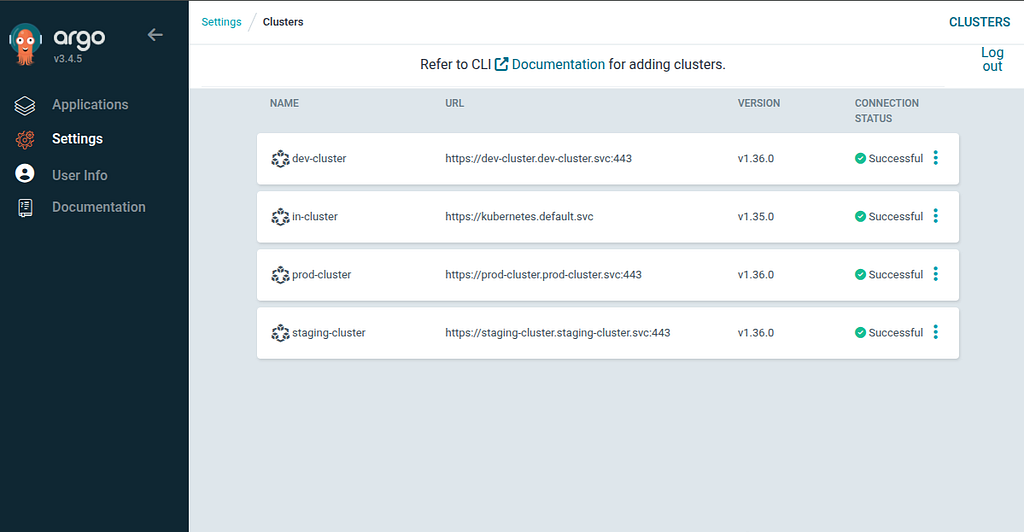
So guestbook-dev’s target is dev-cluster, which is also the child Application’s destination.name and the cluster registered in Argo CD — followed end to end. The guestbook-aoa Space deploys to the host cluster Argo CD itself runs in, so its target is in-cluster, Argo CD’s own name for that cluster. Targets have no Argo CD equivalent — which is why naming them after the destination cluster is what ties the two systems together at a glance.
The set of apps, as a query
With the units published, looking at the set of apps is a query over data that already exists:
$ cub unit list --space "guestbook-*" --where "Labels.Component = 'guestbook'"
SPACE              UNIT          TYPE                 GATED  UNAPPLIED
guestbook-dev      guestbook-ui  apps/v1/Deployment   no     no
guestbook-staging  guestbook-ui  apps/v1/Deployment   no     no
guestbook-prod     guestbook-ui  apps/v1/Deployment   yes    yes
Nothing generates that list. The Units are the data, and the set is a where clause over them. Each Unit is materialized — plain YAML with real values, no templates — and it’s exactly what Argo pulls and syncs:
apiVersion: apps/v1
kind: Deployment
metadata:
  name: guestbook-ui
spec:
  replicas: 2
  revisionHistoryLimit: 3
  selector:
    matchLabels:
      app: guestbook-ui
  template:
    metadata:
      labels:
        app: guestbook-ui
    spec:
      containers:
      - image: gcr.io/google-samples/gb-frontend:v5
        name: guestbook-ui
        ports:
        - containerPort: 80
---
apiVersion: v1
kind: Service
metadata:
  name: guestbook-ui
spec:
  ports:
  - port: 80
    targetPort: 80
  selector:
    app: guestbook-ui
Most of what follows comes down to that difference: the thing you query and change is the same thing that gets deployed.
Checking changes before they’re applied
This is the capability I’d miss most going back to a plain app-of-apps. Normally a bad child config syncs and the violation turns up afterward, in the cluster, if an admission controller or a scan catches it at all. Catching it earlier means rendering every child in CI and running your checks there, which brings back the per-repo commit, push, and render steps.
In ConfigHub, we have a concept called Triggers, and validation and policy tools like Kyverno, OPA Gatekeeper, Kubescape, and others can all be built as Triggers. They run on every change to the configuration data, before it’s released. When a check fails, the trigger attaches an Apply Gate, or a warning if you’d rather not block. Across the same set of apps:
$ cub unit list --space "guestbook-*" --where "GatedCount > 0"
SPACE           UNIT          GATE          REASON
guestbook-prod  guestbook-ui  no-critical   container 'guestbook-ui' runs as root (PodSecurity restricted)
The check runs when the data changes, not when Argo decides to sync it. In the setup above, a gated guestbook-prod unit simply never gets a new latest published to oci://…/unit/guestbook-prod/guestbook, so Argo keeps syncing the last good version — the gate blocks release regardless of whether the change came from a person, from CI, or from an agent.
Seeing what a change affects
A template-based app-of-apps can only show you the source you edited, not the set of live configs it expands to. Because ConfigHub stores the materialized data along with the upstream and downstream relationships between Units, you can look at what a change reaches before releasing it:
$ cub unit tree --node guestbook-base --downstream
guestbook-base
|- guestbook-dev/guestbook-ui
|- guestbook-staging/guestbook-ui
`- guestbook-prod/guestbook-ui   [gated]
That’s a review an app-of-apps doesn’t give you: not the template you changed, but the live targets it expands to and which of them is currently blocked.
Bootstrapping
The one place a Git-based app-of-apps and this setup look identical is the very first step: something has to put the root Application into the cluster. Here it’s one line, straight from ConfigHub:
cub unit data --space guestbook-aoa root | kubectl apply -f -
kubectl get applications -n argocd
Argo CD takes over from there: it pulls app-of-apps over OCI, creates the three child Applications, each pulls its guestbook unit and deploys into its vcluster, creating the guestbook namespace on the way. End state:
NAME                SYNC STATUS   HEALTH STATUS
root                Synced        Healthy
guestbook-dev       Synced        Healthy
guestbook-staging   Synced        Healthy
guestbook-prod      Synced        Healthy
Wrapping up
App-of-apps is a sensible way to get grouping, shared values, dependencies, and a single point of control out of Git and templates, which weren’t built to provide them. What the setup above shows is that you don’t have to choose between the pattern and Configuration as Data: the root, the fan-out, and the children all still work when Argo CD pulls them from ConfigHub over OCI. The things app-of-apps makes awkward — sharing a value without duplicating it, checking the whole set before it syncs, turning on a policy everywhere, seeing what a change affects — are the things you get directly when the configuration behind those Applications is stored as data with relationships between the pieces.
If you already run an app-of-apps, the shared values and the fleet-wide policy rollout are the two things I’d try moving into ConfigHub first. You can do it for a single set of apps without touching the rest — the setup above is one root and three children on a laptop-sized kind cluster — which makes it easy to compare against what you have now.
ConfigHub is in preview — you can try it here. If you do, I’d like to hear how it lines up with your current Argo CD setup; you can find me on LinkedIn.